Owlex




Get a second opinion without leaving Claude Code.
Different AI models have different strengths and blind spots. Owlex lets you query Codex, Gemini, OpenCode, ClaudeOR, and AiChat directly from Claude Code - and optionally run a structured deliberation where they review each other's answers before Claude synthesizes a final response.
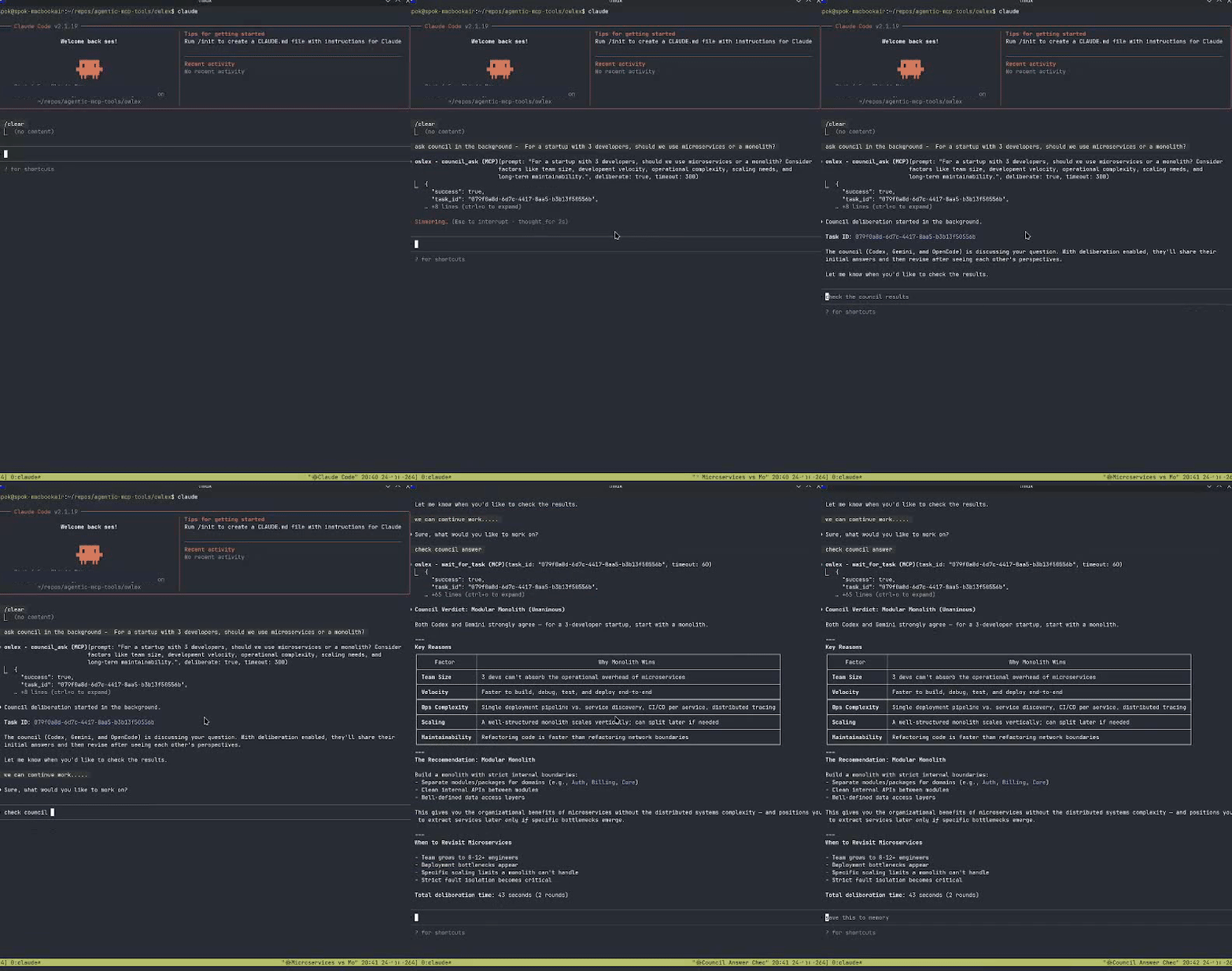
How the Council Works
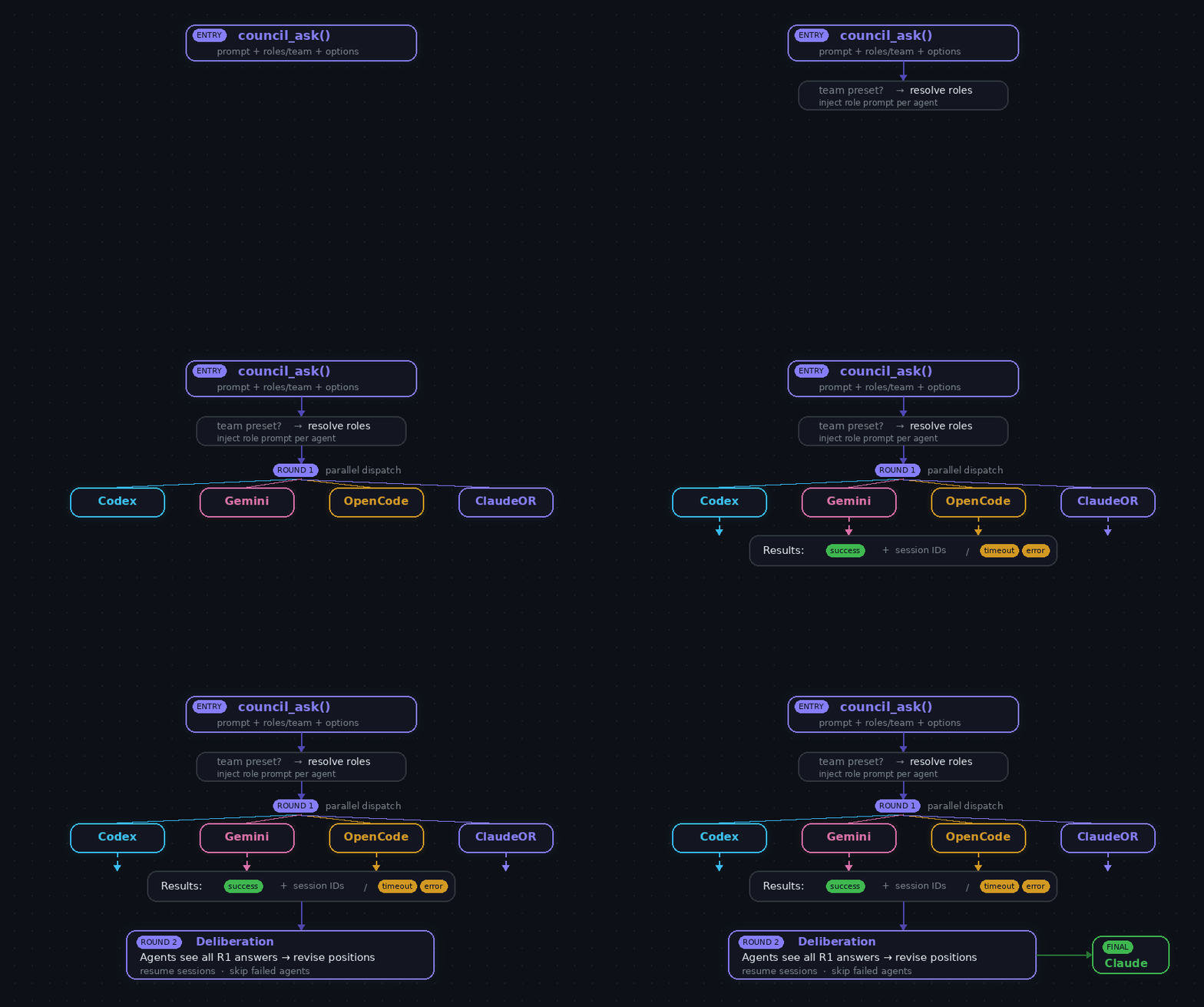
- Round 1 - Your question goes to each agent independently. They answer without seeing each other.
- Round 2 - Each agent sees all Round 1 answers and can revise their position.
- Synthesis - Claude reviews everything and outputs a structured answer.
Use it for architecture decisions, debugging tricky issues, or when you want more confidence than a single model provides. Not for every question - for the ones that matter.
Data Flow
Installation
uv tool install git+https://github.com/agentic-mcp-tools/owlex.gitAdd to .mcp.json:
{
  "mcpServers": {
    "owlex": {
      "command": "owlex-server"
    }
  }
}Usage
Council Deliberation
council_ask prompt="Should I use a monorepo or multiple repos for 5 microservices?"Options:
claude_opinion- Share your initial thinking with agentsdeliberate- Enable Round 2 revision (default: true)critique- Agents critique each other instead of reviseroles- Assign specialist roles (dict or list)team- Use a predefined team presettimeout- Timeout per agent in seconds (default: 300)
Specialist Roles
Agents can operate with specialist perspectives that shape their analysis:
| Role | Description |
|---|---|
security | Security analyst - vulnerabilities, auth, data protection |
perf | Performance optimizer - efficiency, caching, scalability |
skeptic | Devil's advocate - challenge assumptions, find edge cases |
architect | System architect - design patterns, modularity, APIs |
maintainer | Code maintainer - readability, testing, tech debt |
dx | Developer experience - ergonomics, documentation, errors |
testing | Testing specialist - coverage, strategies, edge cases |
neutral | No role injection (default) |
Assign roles explicitly:
council_ask prompt="Review this auth flow" roles={"codex": "security", "gemini": "perf"}Auto-assign from list (in agent order: codex, gemini, opencode, claudeor, aichat):
council_ask prompt="Review this code" roles=["security", "skeptic", "maintainer"]Team Presets
Predefined role combinations for common scenarios:
| Team | Codex | Gemini | OpenCode | ClaudeOR | AiChat |
|---|---|---|---|---|---|
security_audit | security | skeptic | architect | dx | testing |
code_review | maintainer | perf | testing | dx | security |
architecture_review | architect | perf | maintainer | dx | skeptic |
devil_advocate | skeptic | skeptic | skeptic | skeptic | skeptic |
balanced | security | perf | maintainer | dx | testing |
optimal | maintainer | architect | dx | skeptic | perf |
council_ask prompt="Is this design secure?" team="security_audit"Individual Agent Sessions
| Tool | Description |
|---|---|
start_codex_session | New Codex session |
resume_codex_session | Resume with session ID or --last |
start_gemini_session | New Gemini session |
resume_gemini_session | Resume with index or latest |
start_opencode_session | New OpenCode session |
resume_opencode_session | Resume with session ID or --continue |
start_claudeor_session | New Claude via OpenRouter session |
resume_claudeor_session | Resume with session ID or --continue |
start_aichat_session | New AiChat session |
resume_aichat_session | Resume with session name |
Claude Code Skills
Non-blocking slash commands for quick agent invocation:
| Skill | Description |
|---|---|
/codex | Ask Codex a question |
/gemini | Ask Gemini a question |
/council | Run council deliberation |
/critique | Run council in critique mode |
Async Task Management
Council runs in the background. Start a query, keep working, check results later.
| Tool | Description |
|---|---|
wait_for_task | Block until task completes |
get_task_result | Check result without blocking |
list_tasks | List tasks with status filter |
cancel_task | Kill running task |
Configuration
| Variable | Default | Description |
|---|---|---|
COUNCIL_EXCLUDE_AGENTS | `` | Skip agents (e.g., opencode,gemini,claudeor) |
COUNCIL_DEFAULT_TEAM | `` | Default team when none specified (empty = neutral) |
COUNCIL_CLAUDE_OPINION | false | Claude shares its opinion with agents by default |
OWLEX_DEFAULT_TIMEOUT | 300 | Timeout in seconds |
CODEX_BYPASS_APPROVALS | false | Bypass sandbox (use with caution) |
GEMINI_YOLO_MODE | false | Auto-approve Gemini actions |
OPENCODE_AGENT | plan | plan (read-only) or build |
OPENROUTER_API_KEY | `` | OpenRouter API key (enables ClaudeOR agent) |
CLAUDEOR_MODEL | `` | OpenRouter model for ClaudeOR (e.g., deepseek/deepseek-v3.2) |
AICHAT_MODEL | `` | Model for AiChat (e.g., openrouter:minimax/minimax-m2.5) |
Cost Notes
- Codex and Gemini use your existing subscriptions (Claude Max, Google AI Pro, etc.)
- OpenCode and AiChat use API tokens (provider-dependent)
- Exclude agents with
COUNCIL_EXCLUDE_AGENTSto control costs - Use council for important decisions, not every question
When to Use Each Agent
| Agent | Strengths |
|---|---|
| Codex (gpt5.2-codex) | Deep reasoning, code review, bug finding |
| Gemini | 1M context window, multimodal, large codebases |
| OpenCode | Alternative perspective, configurable models |
| ClaudeOR | Claude Code + OpenRouter (DeepSeek, GPT-4o, etc.) |
| AiChat | Multi-provider (20+ backends), bring-your-own-model flexibility |
| Claude | Complex multi-step implementation, synthesis |