English | 简体中文 | 日本語 | 한국어 | Français | Deutsch | Русский
</div> <p align="center"> <img src="docs/images/docsentinel-mascot.png" width="220" alt="DocSentinel mascot logo"/> <br/> <sub>Security review mascot logo for the DocSentinel console and documentation.</sub> </p> <p align="center"> <strong>DocSentinel</strong><br/> <em>AI-powered SSDLC platform — Secure your software from requirements to operations</em> </p> <p align="center"> <a href="https://github.com/arthurpanhku/DocSentinel/releases"><img src="https://img.shields.io/github/v/release/arthurpanhku/DocSentinel?include_prereleases" alt="Latest release"/></a> <a href="https://github.com/arthurpanhku/DocSentinel/blob/main/LICENSE"><img src="https://img.shields.io/badge/License-MIT-yellow.svg" alt="License: MIT"/></a> <a href="https://www.python.org/downloads/"><img src="https://img.shields.io/badge/python-3.11+-blue.svg" alt="Python 3.11+"/></a> <a href="https://github.com/arthurpanhku/DocSentinel"><img src="https://img.shields.io/badge/GitHub-arthurpanhku%2FDocSentinel--Agent-24292e?logo=github" alt="GitHub repo"/></a> <a href="docs/06-agent-integration.md"><img src="https://img.shields.io/badge/MCP-Ready-green?logo=anthropic" alt="MCP Ready"/></a> <a href="docs/06-agent-integration.md"><img src="https://img.shields.io/badge/A2A-1.0-blueviolet" alt="A2A 1.0"/></a> <a href="SECURITY.md"><img src="https://img.shields.io/badge/Human_Review-Required-0f766e" alt="Human review required"/></a> <a href="https://python.langchain.com/"><img src="https://img.shields.io/badge/LangChain-Powered-orange" alt="LangChain"/></a> <a href="https://langchain-ai.github.io/langgraph/"><img src="https://img.shields.io/badge/LangGraph-Orchestrated-blue" alt="LangGraph"/></a> </p> <p align="center"> <a href="https://glama.ai/mcp/servers/arthurpanhku/DocSentinel"> <img width="380" height="200" src="https://glama.ai/mcp/servers/arthurpanhku/DocSentinel/badge" /> </a> </p>What is DocSentinel?
DocSentinel is an AI-powered SSDLC (Secure Software Development Lifecycle) platform for security teams. It automates security activities across all six phases of the software development lifecycle using intelligent AI agents orchestrated by LangGraph and powered by LangChain. It automates the review of security-related documents, forms, and reports — from requirements and design through development, testing, deployment, and operations — comparing inputs against your policy and knowledge base to produce structured assessment reports with risks, compliance gaps, and remediation suggestions.
Instead of only reviewing documents at the pre-release stage, DocSentinel embeds security from day one:
| SSDLC Phase | What DocSentinel Does |
|---|---|
| Requirements | Extract security requirements, identify compliance obligations (GDPR, PCI DSS, SOC2) |
| Design | Automated threat modeling (STRIDE/DREAD), security architecture review, SDR reports |
| Development | Secure coding assessment, SAST findings triage, coding guidance |
| Testing | SAST/DAST report analysis, penetration test review, vulnerability prioritization |
| Deployment | Configuration security review, hardening assessment, release sign-off |
| Operations | Vulnerability monitoring, incident response assistance, log audit |
Built as a React console + FastAPI service + MCP/A2A agent gateway, DocSentinel integrates into local security review workflows, CI/CD pipelines, AI agents, and multi-agent platforms without giving external agents approval authority.
- LangGraph orchestration: Stateful, graph-based agent workflows with conditional branching per SSDLC stage.
- Multi-format input: PDF, Word, Excel, PPT, text — parsed into a unified format for the LLM.
- Knowledge base (RAG): Upload policy and compliance documents; the agent uses them as reference when assessing.
- Multiple LLMs: Use OpenAI, Claude, Qwen, or Ollama (local) via a single interface.
- Structured output: JSON/Markdown reports with risk items, compliance gaps, and actionable remediations.
Ideal for enterprises that need to scale security assessments across many projects and SSDLC stages without proportionally scaling headcount.
Product Tour
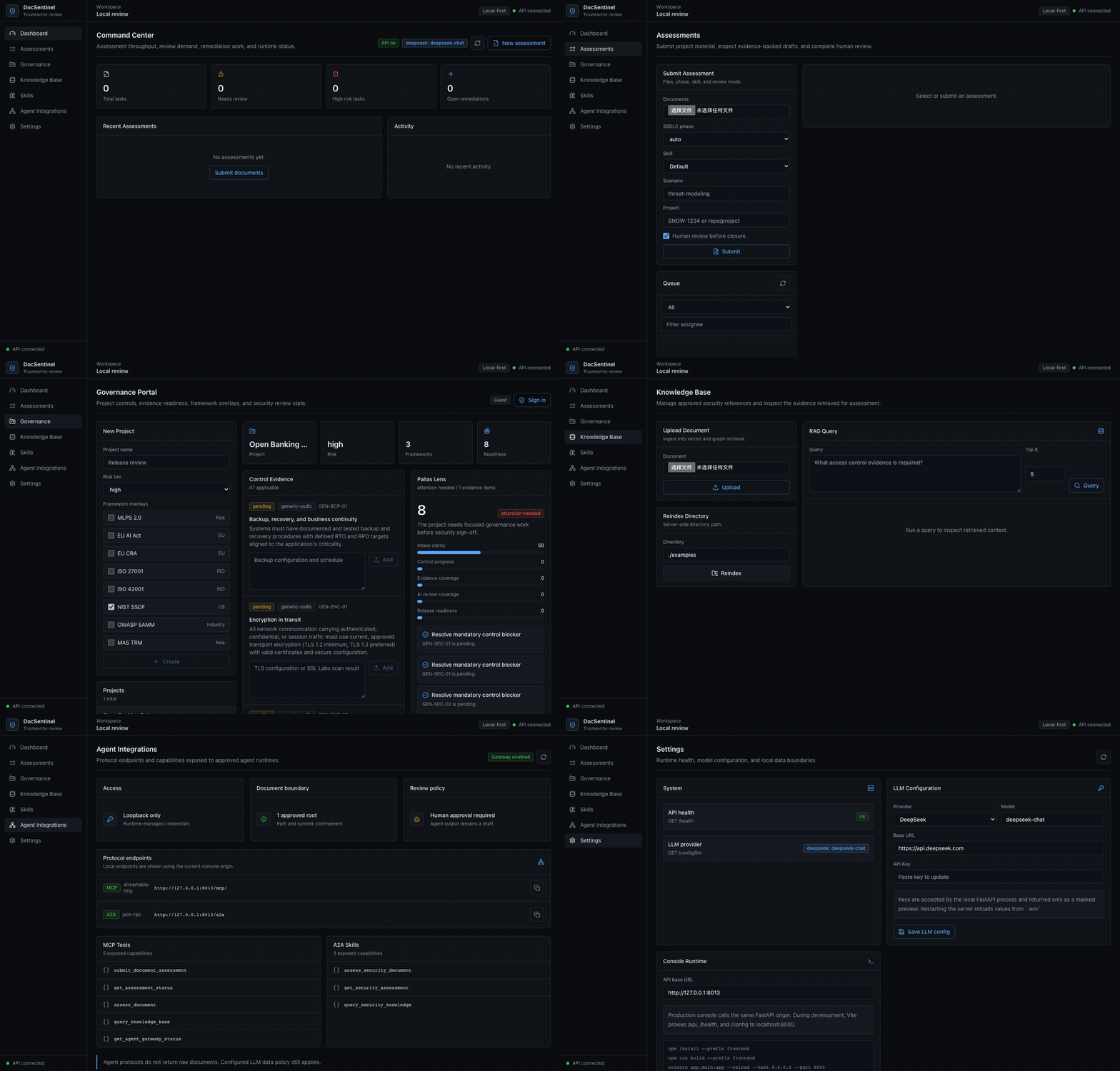
The local React console brings the main workflow into one operational surface:
- Command Center: live API and LLM status, assessment throughput, review demand, remediation queues, and recent activity.
- Assessment Workbench: upload project documents, choose SSDLC phase/skill, inspect AI-generated risks, and complete human review.
- Governance Portal: create projects, apply public framework overlays, generate controls, submit evidence, and track Pallas Lens readiness.
- Knowledge Base: ingest policies and standards for RAG-backed review.
- Agent Integrations: expose governed MCP and A2A tools to coding agents and multi-agent platforms without granting approval authority.
- Settings: switch providers such as DeepSeek, OpenAI, Anthropic, Qwen, or Ollama; API keys are accepted locally and only shown as masked previews.
Why DocSentinel?
| Pain Point | DocSentinel Solution |
|---|---|
| Fragmented SSDLC coverage<br>Most tools only address testing/deployment. | Full lifecycle agents cover all 6 SSDLC phases with dedicated AI personas. |
| Fragmented criteria<br>Policies, standards, and precedents are scattered. | Single knowledge base ensures consistent findings and traceability. |
| No automated threat modeling<br>Threat models are created ad-hoc. | Design Agent generates STRIDE/DREAD threat models from architecture docs. |
| Heavy questionnaire workflow<br>Endless review cycles. | Automated first-pass and gap analysis reduces manual back-and-forth rounds. |
| SAST/DAST report overload<br>Too many findings, too little context. | Testing Agent triages, prioritizes, and maps findings to threat models. |
| Pre-release review pressure<br>Everything lands on security at the end. | Shift-left approach catches issues early in requirements and design. Structured reports help reviewers focus on decision-making. |
| Scale vs. consistency<br>Manual reviews vary by reviewer. | LangGraph workflows and unified pipeline ensure consistent, auditable assessment across projects. |
| SSDLC coverage gaps<br>Security involvement is uneven across lifecycle stages; early stages get less scrutiny. | Stage-aware assessment covers all 6 SSDLC stages with dedicated skills and checklists. |
See the full problem statement and SSDLC phase details in SPEC.md.
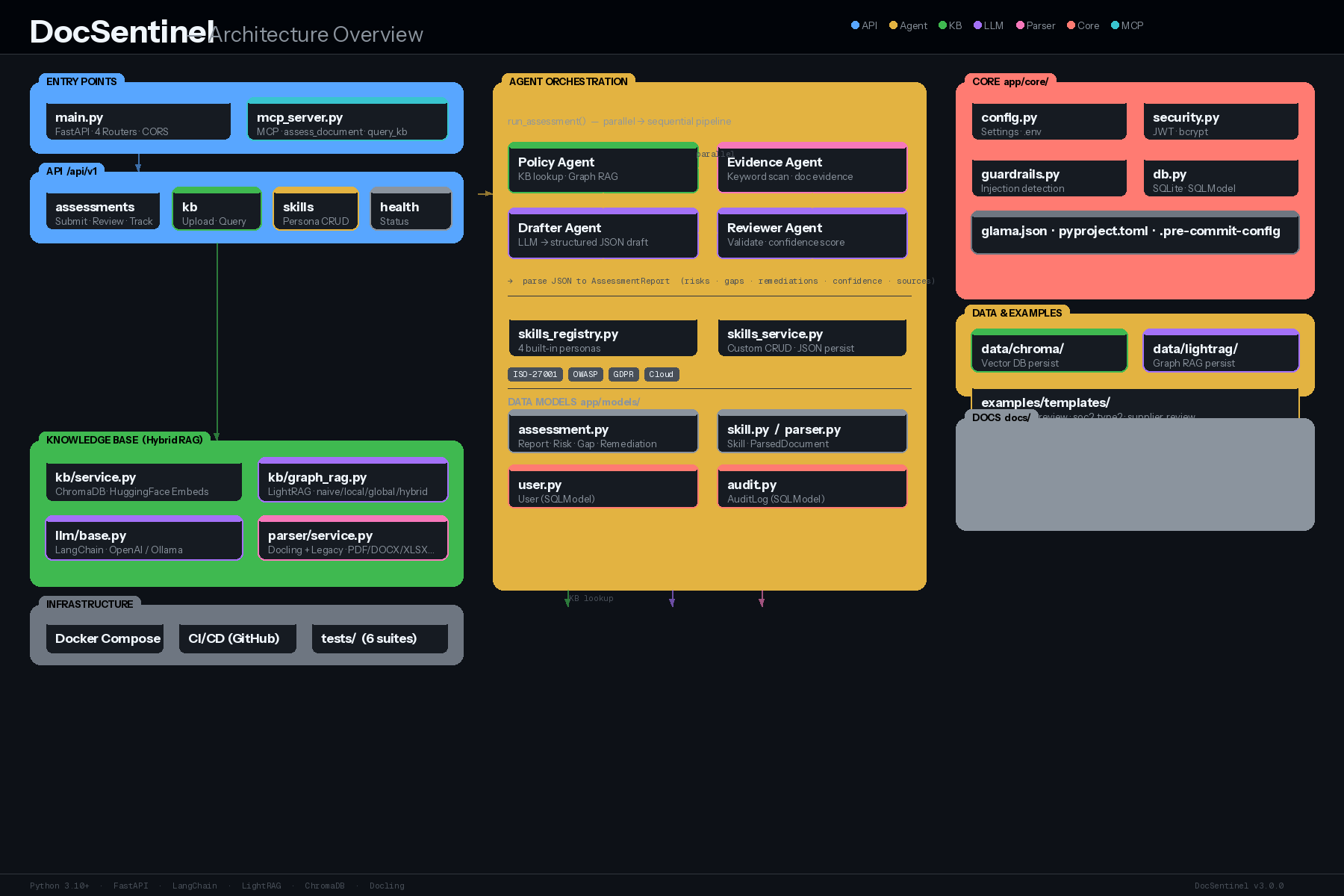
Architecture
DocSentinel is a React Console + FastAPI application with three governed
entry paths: REST APIs for the console and CI, MCP tools for coding agents, and
A2A JSON-RPC for remote agent delegation. These entry paths converge on the
same AssessmentService, LangGraph assessment pipeline, knowledge base, and
human-review lifecycle. Governance workflows from PallasGuard are now a
first-class domain beside assessment, backed by SQLModel records, policy packs,
control evidence, audit trails, and Pallas Lens readiness scoring.
flowchart TB
    subgraph Access["Users and Agent Access"]
        direction LR
        Staff["Security staff"]
        Console["React Console<br/>(Vite + Tailwind)"]
        RESTClient["REST / CI clients"]
        AgentClient["MCP / A2A clients"]
    end

    subgraph Runtime["FastAPI Runtime"]
        direction LR
        Security["Security boundary<br/>CORS, rate limit, JWT/RBAC,<br/>gateway token or loopback"]
        REST["REST API routers<br/>assessments, KB, skills,<br/>settings, governance"]
        Gateway["Agent Gateway<br/>MCP tools + A2A JSON-RPC"]
        Tasks["AssessmentService<br/>async tasks, activity log,<br/>human review queue"]
    end

    subgraph Pipeline["Assessment Pipeline"]
        direction LR
        Parse["Parse + guardrails<br/>Docling or legacy"]
        Graph["LangGraph workflow<br/>skill, isolated document data,<br/>policy/history/evidence context"]
        Review["LLM draft + review<br/>via LangChain"]
        Validate["Schema validation<br/>+ S2O rule checks"]
        Report["Structured report<br/>risks, gaps, remediations"]
    end

    subgraph Governance["Governance / Pallas Domain"]
        direction LR
        Projects["Projects + framework selection"]
        Controls["Control generator<br/>questionnaires + applicability"]
        Evidence["Gate submissions<br/>evidence + audit logs"]
        Lens["Pallas Lens<br/>readiness + exports"]
    end

    subgraph Support["Shared Support Services"]
        direction LR
        KB["KnowledgeBaseService<br/>Chroma + LightRAG + history"]
        Policies["Policy packs + overlays<br/>schema service + S2O ontology"]
        LLMFactory["LLM factory<br/>settings + llm_config.json<br/>base_url SSRF guard"]
        Providers["OpenAI, Anthropic, Qwen,<br/>DeepSeek, Ollama, local OpenAI"]
        DB["SQLModel DB<br/>SQLite or Postgres"]
    end

    Staff --> Console
    Console --> Security
    RESTClient --> Security
    AgentClient --> Security
    Security --> REST
    Security --> Gateway
    REST --> Tasks
    Gateway --> Tasks
    REST --> Projects
    REST --> KB
    Tasks --> Parse --> Graph --> Review --> Validate --> Report
    Report --> Tasks
    Report -->|project_id present| Evidence
    Projects --> Controls --> Evidence --> Lens
    Graph --> KB
    Graph --> Policies
    Review --> LLMFactory --> Providers
    Validate --> Policies
    Policies --> Controls
    Projects --> DB
    Controls --> DB
Evidence --> DBData flow (simplified):
- Security staff work in the React console; REST clients call
/api/v1/*; coding agents call MCP or A2A through the agent gateway. - REST write paths use JWT/RBAC dependencies. Agent protocols use a bearer gateway token or loopback-only development access. LLM-costly POST paths are rate limited by IP or bearer token.
- Assessment submissions enter
AssessmentService, which creates an async task, parses uploaded or approved local documents, applies guardrails, and invokes the LangGraph assessment pipeline. - The LangGraph pipeline loads the selected skill, wraps untrusted document content as data, retrieves policy/history/evidence context from the KB, asks the LLM for draft/review text, and converts the result into the structured assessment schema.
- Deterministic services remain authoritative for governance decisions: policy-pack schemas, the S2O rule engine, control applicability, and schema validation cross-check LLM output before it enters the review queue.
- When an assessment is linked to a project, findings are persisted as Gate 3 control evidence. Governance workflows then use the same SQLModel store for projects, controls, submissions, audit logs, Pallas Lens scoring, and exports.
- The KB persists chunks in Chroma, optional graph artifacts in LightRAG, and
prior assessment history for reuse. Runtime LLM settings are loaded from
.envplusllm_config.json, and every provider base URL is checked by the network guard before client construction.
Detailed architecture: ARCHITECTURE.md and docs/01-architecture-and-tech-stack.md.
Core Capabilities
SSDLC Full Lifecycle Coverage
Six dedicated AI agents, each with phase-specific skills, prompts, and knowledge base collections. Run individual phases or a full end-to-end SSDLC assessment:
- Requirements: Security requirements, compliance mapping,
…