Wazuh MCP Server - Talk to your SIEM
A Rust-based server designed to bridge the gap between a Wazuh Security Information and Event Management (SIEM) system and applications requiring contextual security data, specifically tailored for the Claude Desktop Integration using the Model Context Protocol (MCP).
Overview
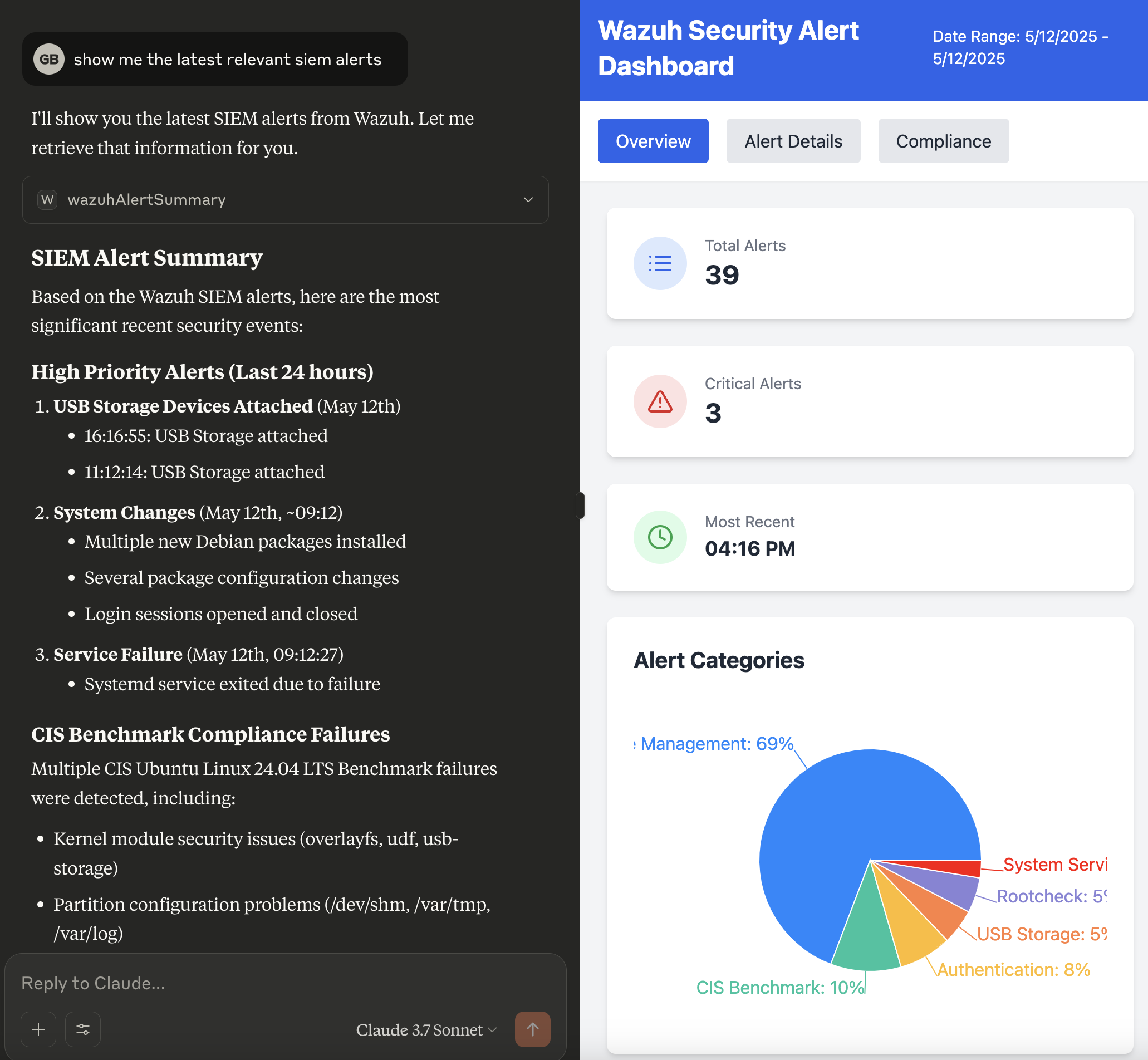
Modern AI assistants like Claude can benefit significantly from real-time context about the user's security environment. The Wazuh MCP Server bridges this gap by providing comprehensive access to Wazuh SIEM data through natural language interactions.
This server transforms complex Wazuh API responses into MCP-compatible format, enabling AI assistants to access:
- Security Alerts & Events from the Wazuh Indexer for threat detection and incident response
- Agent Management & Monitoring including health status, system processes, and network ports
- Vulnerability Assessment data for risk management and patch prioritization
- Security Rules & Configuration for detection optimization and compliance validation
- System Statistics & Performance metrics for operational monitoring and audit trails
- Log Analysis & Forensics capabilities for incident investigation and compliance reporting
- Cluster Health & Management for infrastructure reliability and availability requirements
- Compliance Monitoring & Gap Analysis for regulatory frameworks like PCI-DSS, HIPAA, SOX, and GDPR
Rather than requiring manual API calls or complex queries, security teams can now ask natural language questions like "Show me critical vulnerabilities on web servers," "What processes are running on agent 001?" or "Are we meeting PCI-DSS logging requirements?" and receive structured, actionable data from their Wazuh deployment.
This approach is particularly valuable for compliance teams who need to quickly assess security posture, identify gaps in monitoring coverage, validate rule effectiveness, and generate evidence for audit requirements across distributed infrastructure.
Example Use Cases
The Wazuh MCP Server provides direct access to Wazuh security data through natural language interactions, enabling several practical use cases:
Security Alert Analysis
- Alert Triage and Investigation: Query recent security alerts with
get_wazuh_alert_summaryto quickly identify and prioritize threats requiring immediate attention. - Alert Pattern Recognition: Analyze alert trends and patterns to identify recurring security issues or potential attack campaigns.
Vulnerability Management
- Agent Vulnerability Assessment: Use
get_wazuh_vulnerability_summaryandget_wazuh_critical_vulnerabilitiesto assess security posture of specific agents and prioritize patching efforts. - Risk-Based Vulnerability Prioritization: Correlate vulnerability data with agent criticality and exposure to focus remediation efforts.
System Monitoring and Forensics
- Process Analysis: Investigate running processes on agents using
get_wazuh_agent_processesfor threat hunting and system analysis. - Network Security Assessment: Monitor open ports and network services with
get_wazuh_agent_portsto identify potential attack vectors. - Agent Health Monitoring: Track agent status and connectivity using
get_wazuh_running_agentsto ensure comprehensive security coverage.
Security Operations Intelligence
- Rule Effectiveness Analysis: Review and analyze security detection rules with
get_wazuh_rules_summaryto optimize detection capabilities. - Manager Performance Monitoring: Track system performance and statistics using tools like
get_wazuh_weekly_stats,get_wazuh_remoted_stats, andget_wazuh_log_collector_stats. - Cluster Health Management: Monitor Wazuh cluster status with
get_wazuh_cluster_healthandget_wazuh_cluster_nodesfor operational reliability.
Incident Response and Forensics
- Log Analysis: Search and analyze manager logs using
search_wazuh_manager_logsandget_wazuh_manager_error_logsfor incident investigation. - Agent-Specific Investigation: Combine multiple tools to build comprehensive profiles of specific agents during security incidents.
- Natural Language Security Queries: Ask complex security questions in natural language and receive structured data from multiple Wazuh components.
Operational Efficiency
- Automated Reporting: Generate security reports and summaries through conversational interfaces without manual API calls.
- Cross-Component Analysis: Correlate data from both Wazuh Indexer (alerts) and Wazuh Manager (agents, rules, vulnerabilities) for comprehensive security insights.
- Multilingual Security Operations: Access Wazuh data and receive insights in multiple languages for global security teams.
Threat Intelligence Gathering and Response
For enhanced threat intelligence and incident response capabilities, the Wazuh MCP Server can be combined with complementary security MCP servers:
| Server | Description |
|---|---|
| Cortex MCP Server | Artifact analysis and IOC enrichment via 140+ analyzers |
| TheHive MCP Server | Case management and incident response orchestration |
| MISP MCP Server | Threat intelligence sharing and IOC lookup |
Enhanced Capabilities with Cortex Integration:
- Artifact Analysis: Automatically analyze suspicious files, URLs, domains, and IP addresses found in Wazuh alerts using Cortex's 140+ analyzers
- IOC Enrichment: Enrich indicators of compromise (IOCs) from Wazuh alerts with threat intelligence from multiple sources including VirusTotal, Shodan, MISP, and more
- Automated Threat Hunting: Combine Wazuh's detection capabilities with Cortex's analysis engines to automatically investigate and classify threats
- Multi-Source Intelligence: Leverage analyzers for reputation checks, malware analysis, domain analysis, and behavioral analysis
- Response Orchestration: Use analysis results to inform automated response actions and alert prioritization
Enhanced Capabilities with TheHive Integration:
- Case Creation: Automatically create cases in TheHive from Wazuh alerts for structured incident tracking
- Alert Correlation: Link related Wazuh alerts to existing cases for comprehensive incident timelines
- Task Management: Create and track investigation tasks based on alert severity and type
- Observable Management: Extract and manage IOCs as observables within case investigations
- Collaboration: Enable security team collaboration on incidents detected by Wazuh
Enhanced Capabilities with MISP Integration:
- IOC Lookup: Check if indicators from Wazuh alerts are known in your threat intelligence database
- Threat Context: Retrieve event context, threat actor attribution, and MITRE ATT&CK mappings for IOCs
- False Positive Reduction: Validate IOCs against MISP warninglists to reduce false positives
- Sighting Tracking: Record and query sighting history to assess IOC prevalence
- Galaxy Exploration: Access threat actor profiles, malware families, and attack patterns
Example Workflow:
- Wazuh detects a suspicious file hash or network connection in an alert
- The AI assistant queries the MISP MCP Server to check if the IOC is known in threat intelligence
- If unknown, the Cortex MCP Server analyzes the artifact using multiple analyzers
- Results from VirusTotal, hybrid analysis, domain reputation, and other sources are correlated
- A case is created in TheHive via the TheHive MCP Server to track the investigation
- The combined intelligence provides context for incident response decisions
- Findings can be used to update Wazuh rules or trigger additional monitoring
Requirements
- An MCP (Model Context Protocol) compatible LLM client (e.g., Claude Desktop)
- A running Wazuh server (v4.12 recommended) with the API enabled and accessible.
- Network connectivity between this server and the Wazuh API (if API interaction is used).
Installation
Option 1: Download Pre-built Binary (Recommended)
- Download the Binary:
- Go to the Releases page of the
mcp-server-wazuhGitHub repository. - Download the appropriate binary for your operating system (e.g.,
mcp-server-wazuh-linux-amd64,mcp-server-wazuh-macos-amd64,mcp-server-wazuh-macos-arm64,mcp-server-wazuh-windows-amd64.exe). - Make the downloaded binary executable (e.g.,
chmod +x mcp-server-wazuh-linux-amd64). - (Optional) Rename it to something simpler like
mcp-server-wazuhand move it to a directory in your system'sPATHfor easier access.
- Go to the Releases page of the
Option 2: Docker
- Pull the Docker Image:
docker pull ghcr.io/gbrigandi/mcp-server-wazuh:latest
Option 3: Build from Source
-
Prerequisites:
- Install Rust: https://www.rust-lang.org/tools/install
-
Build:
git clone https://github.com/gbrigandi/mcp-server-wazuh.git cd mcp-server-wazuh # Build with stdio transport only (default) cargo build --release # Build with HTTP transport support cargo build --release --features httpThe binary will be available at
target/release/mcp-server-wazuh.
Configure Your LLM Client
The method for configuring your LLM client will vary depending on the client itself. For clients that support MCP (Model Context Protocol), you will typically need to point the client to the path of the mcp-server-wazuh executable.
Example for Claude Desktop:
Configure your claude_desktop_config.json file:
{
  "mcpServers": {
    "wazuh": {
      "command": "/path/to/mcp-server-wazuh",
      "args": [],
      "env": {
        "WAZUH_API_HOST": "your_wazuh_manager_api_host",
        "WAZUH_API_PORT": "55000",
        "WAZUH_API_USERNAME": "your_wazuh_api_user",
        "WAZUH_API_PASSWORD": "your_wazuh_api_password",
        "WAZUH_INDEXER_HOST": "your_wazuh_indexer_host",
        "WAZUH_INDEXER_PORT": "9200",
        "WAZUH_INDEXER_USERNAME": "your_wazuh_indexer_user",
        "WAZUH_INDEXER_PASSWORD": "your_wazuh_indexer_password",
        "WAZUH_VERIFY_SSL": "false",
        "WAZUH_TEST_PROTOCOL": "https",
        "RUST_LOG": "info"
      }
    }
  }
}Replace /path/to/mcp-server-wazuh with the actual path to your binary and configure the environment variables as detailed in the Configuration section.
Once configured, your LLM client should be able to launch and communicate with the mcp-server-wazuh to access Wazuh security data.
If using Docker, create a .env file with your Wazuh configuration:
WAZUH_API_HOST=your_wazuh_manager_api_host
WAZUH_API_PORT=55000
WAZUH_API_USERNAME=your_wazuh_api_user
WAZUH_API_PASSWORD=your_wazuh_api_password
WAZUH_INDEXER_HOST=your_wazuh_indexer_host
WAZUH_INDEXER_PORT=9200
WAZUH_INDEXER_USERNAME=your_wazuh_indexer_user
WAZUH_INDEXER_PASSWORD=your_wazuh_indexer_password
WAZUH_VERIFY_SSL=false
WAZUH_TEST_PROTOCOL=https
RUST_LOG=infoConfigure your claude_desktop_config.json file:
{
  "mcpServers": {
    "wazuh": {
      "command": "docker",
      "args": [
        "run", "--rm", "-i",
        "--env-file", "/path/to/your/.env",
        "ghcr.io/gbrigandi/mcp-server-wazuh:latest"
      ]
    }
  }
}Configuration
Configuration is managed through environment variables. A .env file can be placed in the project root for local development.
| Variable | Description | Default | Required | | ------------------------ | --
…