GitLab MCP Server

📖 Documentation → Setup guides, environment variables, and the full tool reference live on the hosted docs site.
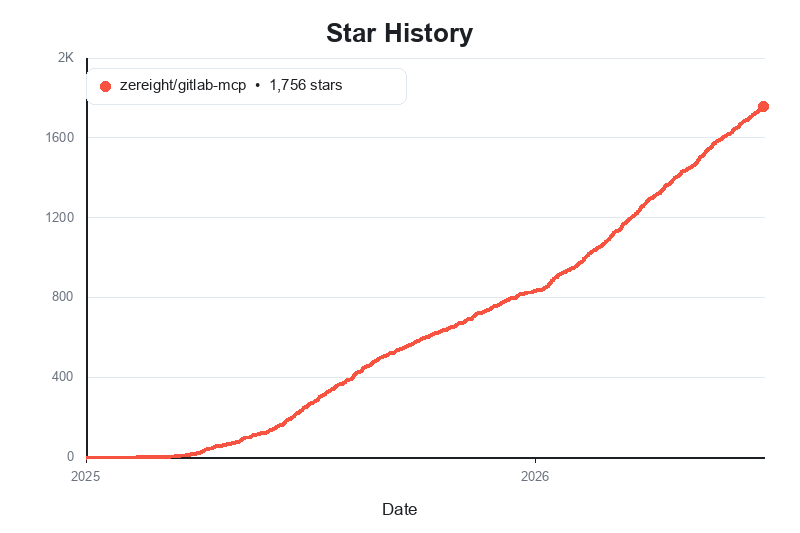
@zereight/mcp-gitlab
A comprehensive GitLab MCP server for AI clients. Manage projects, merge requests, issues, pipelines, wiki, releases, tags, milestones, and more through stdio, SSE, and Streamable HTTP.
Supports PAT, OAuth, read-only mode, dynamic API URLs, and remote authorization for VS Code, Claude, Cursor, Copilot, and other MCP clients.
Why use this GitLab MCP?
- Broad GitLab coverage — projects, repository browsing, merge requests, issues, pipelines, wiki, releases, tags, labels, milestones, and more
- Flexible auth — Personal Access Token, local OAuth2 browser flow, MCP OAuth proxy, and per-request remote authorization
- Multiple transports — stdio for local clients, SSE for legacy clients, and Streamable HTTP for modern remote deployments
- Client-friendly setup — examples for Claude Code, Codex, Antigravity, OpenCode, Copilot, Cline, Roo Code, Cursor, Kilo Code, and Amp Code
- Self-hosted ready — works with custom GitLab instances, proxy settings, and dynamic API URL routing
Quick start: choose either Personal Access Token or OAuth2 setup below, install @zereight/mcp-gitlab, and use zereight-mcp-gitlab in your MCP client configuration.
Client Setup Guides
- Claude Code Setup Guide
- VS Code Setup Guide
- GitHub Copilot Setup Guide
- Codex Setup Guide
- Cursor Setup Guide
- JSON-Based MCP Clients Setup Guide - for Factory AI Droid, OpenClaw, and OpenCode style clients
- OAuth2 Authentication Setup Guide
- Environment Variables Reference
- Stateless Mode — Multi-Pod HPA
- Custom Agents and Multiple PAT Setup
Usage
Setup Overview
Authentication Methods
The server supports four authentication methods:
For local/desktop use (most common):
- Personal Access Token (
GITLAB_PERSONAL_ACCESS_TOKEN) — simplest setup - OAuth2 — Local Browser (
GITLAB_USE_OAUTH) — recommended for better security
For server/remote deployments:
- OAuth2 — MCP Proxy (
GITLAB_MCP_OAUTH) — for remote MCP clients such as Claude.ai - Remote Authorization (
REMOTE_AUTHORIZATION) — multi-user deployments where each caller provides their own token
Quick setup paths
- Claude Code: see Claude Code Setup Guide
- VS Code: see VS Code Setup Guide
- GitHub Copilot: see GitHub Copilot Setup Guide
- Codex: see Codex Setup Guide
- Cursor: see Cursor Setup Guide
- Factory AI Droid / OpenClaw / OpenCode style clients: see JSON-Based MCP Clients Setup Guide
- OAuth browser flow details: see OAuth2 Authentication Setup Guide
For the simplest local setup, start with a Personal Access Token. For browser-based local auth, use OAuth2. For remote or multi-user deployments, continue to the MCP OAuth and Remote Authorization sections later in this README.
Install the server once:
brew tap zereight/gitlab-mcp https://github.com/zereight/gitlab-mcp
brew install zereight/gitlab-mcp/zereight-mcp-gitlabOr with npm:
npm install -g @zereight/mcp-gitlabThe examples use zereight-mcp-gitlab, a less collision-prone alias for the legacy mcp-gitlab binary. If your MCP client cannot find it, use the absolute path from which zereight-mcp-gitlab.
No global install? Pin npx to the previous stable release (the version these docs recommend), for example npx -y @zereight/mcp-gitlab@2.1.45. If you always want the newest release, use npx -y @zereight/mcp-gitlab@latest instead. The server prints a notice to stderr on startup when a newer version is available (disable with GITLAB_DISABLE_VERSION_CHECK=true).
Using CLI Arguments (for clients with env var issues)
Some MCP clients (like GitHub Copilot CLI) have issues with environment variables. Use CLI arguments instead:
{
  "mcpServers": {
    "gitlab": {
      "command": "zereight-mcp-gitlab",
      "args": ["--token=YOUR_GITLAB_TOKEN", "--api-url=https://gitlab.com/api/v4"],
      "tools": ["*"]
    }
  }
}Available CLI arguments:
--token- GitLab Personal Access Token (replacesGITLAB_PERSONAL_ACCESS_TOKEN)--api-url- GitLab API URL (replacesGITLAB_API_URL)--read-only=true- Enable read-only mode (replacesGITLAB_READ_ONLY_MODE, deprecated — prefer--permission-mode=readonly)--permission-mode- Permission level:readonly,modify(no delete tools), orfull(replacesGITLAB_PERMISSION_MODE, defaultfull)--use-wiki=true- Enable wiki API (replacesUSE_GITLAB_WIKI, legacy — preferGITLAB_TOOLSETS=wiki)--use-milestone=true- Enable milestone API (replacesUSE_MILESTONE, legacy — preferGITLAB_TOOLSETS=milestones)--use-pipeline=true- Enable pipeline API (replacesUSE_PIPELINE, legacy — preferGITLAB_TOOLSETS=pipelines)--disable-version-check=true- Disable the startup new-version notice (replacesGITLAB_DISABLE_VERSION_CHECK)
CLI arguments take precedence over environment variables.
Fine-grained tool filtering: use
GITLAB_PERMISSION_MODE=modifyto allow create/update while blocking every delete tool (including delete mutations throughexecute_graphql), orGITLAB_PERMISSION_MODE=readonlyfor read-only access. You can also enable toolset groups withGITLAB_TOOLSETS=<group,…>, allow-list individual tools withGITLAB_TOOLS=<tool,…>(e.g. read-only groups plus a few specific write tools), and deny-list by pattern withGITLAB_DENIED_TOOLS_REGEX. The legacyUSE_GITLAB_WIKI/USE_MILESTONE/USE_PIPELINEflags are kept for backward compatibility only. See Tools Reference and Environment Variables.
- sse
docker run -i --rm \
  -e HOST=0.0.0.0 \
  -e GITLAB_PERSONAL_ACCESS_TOKEN=your_gitlab_token \
  -e GITLAB_API_URL="https://gitlab.com/api/v4" \
  -e GITLAB_PERMISSION_MODE=readonly \
  -e GITLAB_TOOLSETS=wiki,milestones,pipelines \
  -e SSE=true \
  -e SSE_AUTH_TOKEN=your_mcp_sse_token \
  -p 3333:3002 \
zereight050/gitlab-mcp{
"mcpServers": {
"gitlab": {
"type": "sse",
"url": "http://localhost:3333/sse",
"headers": {
"Authorization": "Bearer your_mcp_sse_token"
}
}
}
}- streamable-http
docker run -i --rm \
  -e HOST=0.0.0.0 \
  -e REMOTE_AUTHORIZATION=true \
  -e GITLAB_API_URL="https://gitlab.com/api/v4" \
  -e GITLAB_PERMISSION_MODE=readonly \
  -e GITLAB_TOOLSETS=wiki,milestones,pipelines \
  -e STREAMABLE_HTTP=true \
  -p 3333:3002 \
zereight050/gitlab-mcp{
"mcpServers": {
"gitlab": {
"type": "streamable-http",
"url": "http://localhost:3333/mcp",
"headers": {
"Authorization": "Bearer glpat-..."
}
}
}
}Using MCP OAuth Proxy (GITLAB_MCP_OAUTH)
For server/remote deployments only. This mode requires the MCP server to be deployed with a publicly accessible HTTPS URL. For local/desktop use, see
GITLAB_USE_OAUTHabove.
For remote MCP clients that support the MCP OAuth specification (e.g. Claude.ai).
The server acts as a full OAuth 2.0 authorization server — unauthenticated requests
receive a 401 + WWW-Authenticate response, which triggers the OAuth browser flow
automatically on the client side.
Remote MCP clients such as OpenCode, MCPJam, and Claude.ai can send their own
callback URL during authorization. If you cannot register every client callback
URL in GitLab, enable GITLAB_OAUTH_CALLBACK_PROXY=true. With callback proxy
mode, GitLab only needs one registered redirect URI: {MCP_SERVER_URL}/callback.
GITLAB_OAUTH_REDIRECT_URI is for local OAuth (GITLAB_USE_OAUTH) only. It does
not override remote MCP OAuth client callback URLs and should not be used to fix
remote Unregistered redirect_uri errors.
This variable exists because the local OAuth flow starts a browser on the same
machine as the MCP server and listens for the callback on a local HTTP server,
for example http://127.0.0.1:8888/callback.
Remote MCP OAuth is different. In GITLAB_MCP_OAUTH=true mode, the MCP client
provides its own callback URL during /authorize. GITLAB_OAUTH_REDIRECT_URI
does not replace that client-provided URL.
| Mode | Enable with | Callback variable | GitLab redirect URI |
|---|---|---|---|
| Local OAuth | GITLAB_USE_OAUTH=true | GITLAB_OAUTH_REDIRECT_URI | http://127.0.0.1:8888/callback or your local callback |
| Remote MCP OAuth | GITLAB_MCP_OAUTH=true | GITLAB_OAUTH_CALLBACK_PROXY=true | {MCP_SERVER_URL}/callback |
Use GITLAB_OAUTH_REDIRECT_URI only when the MCP server itself owns the local
browser callback. Use GITLAB_OAUTH_CALLBACK_PROXY=true when a remote MCP client
owns the callback URL.
How it works: You deploy this MCP server somewhere with a public HTTPS URL. MCP
clients connect to {MCP_SERVER_URL}/mcp. The server handles the OAuth 2.0 flow,
exchanging credentials with GitLab on behalf of the client.
Prerequisites:
- A publicly accessible HTTPS server URL (
MCP_SERVER_URL) — use ngrok for local testing - A pre-registered GitLab OAuth application with
api(orread_api) scopes — Go toAdmin area→Applications, set Redirect URI to{MCP_SERVER_URL}/callback
| Environment Variable | Required | Description |
|---|---|---|
GITLAB_MCP_OAUTH | ✅ | Set to true to enable |
GITLAB_API_URL | ✅ | GitLab API base URL |
GITLAB_OAUTH_APP_ID | ✅ | GitLab OAuth Application ID |
MCP_SERVER_URL | ✅ | Public HTTPS URL of this MCP server |
STREAMABLE_HTTP | ✅ | Must be true |
GITLAB_OAUTH_CALLBACK_PROXY | optional | Set to true to use the MCP server's fixed /callback URL |
…