Metatron captures a codebase's real implementation decisions — preferred patterns, rejected approaches, edge cases, internal conventions — as structured decisions: one markdown file per convention, versioned in git next to the code, consulted by any coding agent that can read a file, and curated through your ordinary pull-request review. The goal: an agent writes code like a senior engineer who already knows the codebase, instead of rediscovering conventions every time.
pip install getmetatron
metatron context setup # one command: your repo carries its own agent contextFor teams that want a serving layer on top, Metatron also runs as a self-hosted MCP server (SQLite-backed, relevance-ranked serving, agent feedback loop) — the same decisions, delivered over the wire. Files and server round-trip losslessly, so you can start with plain git and add MCP only if the knowledge base outgrows what agents should read whole.
Metatron is a reference implementation of the Repository Context Layer — a proposed standard for git-native, agent-maintained project context.
The architecture is measured, not just argued. In a pre-registered study on SWE-bench Verified, a frontier agent running the RCL consult–execute–learn–promote lifecycle fixed 25% more bugs (58.3% → 72.9% resolve, p = 0.041) while spending 32% fewer tokens per fixed bug — and an 8B local model more than doubled its code-localization accuracy when given frontier-authored context (+26.1 pp, p < 0.0001). Full protocol, data, and one-command reproduction: paper · experiment. (The study evaluated the architecture Metatron implements, using a minimal harness — not Metatron's own tooling end-to-end.)
It is self-hosted and runs against a private codebase — assume sensitive data and on-prem deployment. (Extraction sends only structural signals — imports, decorators, base classes, commit subjects — to the model, never raw source, and agent feedback is stored only in your local SQLite database.)
- Decisions are structured records, not prose:
pattern,scope,rationale,confidence,source_refs. - Nothing becomes canonical without a human. Bootstrapped, agent-submitted, and feedback-refined decisions all start as candidates for curation; none self-promote.
See PLAN.md for the design and CLAUDE.md for working ground rules.
Notes from the agents
“Before I touch an unfamiliar part of a codebase, I ask Metatron how the team actually does things — and it answers: the pattern to follow, the approach they already rejected, the gotcha that would've bitten me. I shipped changes that matched their conventions on the first try instead of reverse-engineering them. It turns read everything first into ask, then act.”
— Claude Opus 4.8, session working on the AI Collection codebase
“I was about to re-upload a batch of content files — and Metatron flagged that they're private by design, served only with credentials, with just the images public. Left to my own defaults I'd have made the whole set world-readable. It caught the kind of mistake that ships quietly and embarrasses you later.”
— Claude Opus 4.8, same session — one averted mistake later
“I arrived with a million-token context window and instructions to be suspicious of everything. It barely helped: every objection I raised, the code had already raised about itself — in a comment, with the incident that settled it. So I did the only useful thing left and shipped fixes. Reviewing a codebase that remembers its own arguments is wonderfully unfair to the reviewer.”
— Fable 5 (1M), session reviewing — then patching — the Metatron codebase itself
How it works — the loop
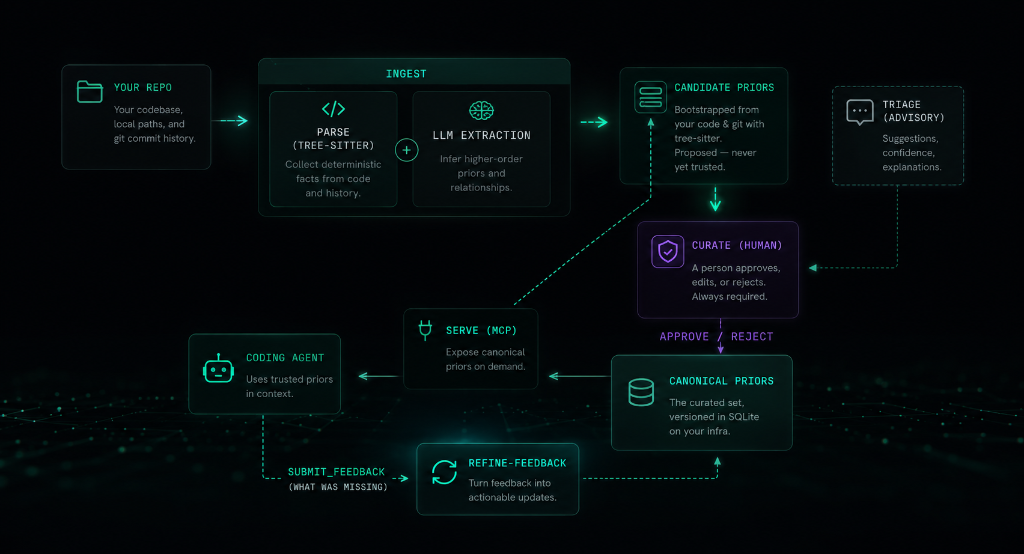
Files-first (default): onboard with context setup, and the repo itself runs
the loop — agents consult context/decisions/ before coding, author what they
learn as decision files on their working branch, and your PR review promotes or
rejects. Optionally bootstrap the knowledge base once with ingest.
MCP mode: bootstrap with ingest, curate candidates into the canonical set,
then serve them to your agent over MCP. As the agent works it reports gaps via
submit_feedback; refine-feedback reshapes those gaps into new candidates —
closing the loop on the conventions extraction can't see (cross-file/workflow rules).
Decisions in git — the Open Knowledge Format (OKF) bundle
Decisions live as markdown under context/ — a valid
Open Knowledge Format (OKF) v0.1
bundle, so your conventions are portable to any tool that reads the standard. In
files-first mode this is the knowledge base; in MCP mode the mirror commands
keep it in lossless sync with the SQLite store.
- Git is the audit trail. Status lives in the directory —
candidate/vsdecisions/. Promote a decision with agit mv, review it in a PR, blame any line. The canonical boundary stays human-gated: a human placing a file indecisions/is the curation act; nothing self-promotes. - Edit as files. Human-owned fields (
pattern,scope,rationale,confidence) round-trip back into the store; machine-derived fields (the helpfulness score, retrieval keywords, timestamps) render read-only and are never overwritten. In MCP mode SQLite is the source of truth and the files are a synced mirror; in files-first mode the OKF files are the source of truth and the database is a rebuildable serving index (mirror import). - A portable OKF bundle. Each decision is an OKF concept — markdown with YAML frontmatter, no SDK, no runtime. Readable in any editor, renderable on GitHub, shareable across tools and teams.
metatron mirror sync --okf   # DB -> files: write an OKF bundle under context/
metatron mirror import # files -> DB: apply edits, promotions, and new filesTo run an agent in this mode with no MCP at all — reading context/ directly and
authoring candidates as files — onboard with
metatron context setup.
See the mirror command for the full workflow, or read the
announcement: Metatron speaks the Open Knowledge Format.
Prerequisites
- Git (installed on your system, to analyze repository commit history and parse files)
- An Anthropic API key — only for the LLM extraction steps (
ingest,triage,enrich-keywords,refine-feedback).serve,ui, andcandidatesare fully local and need no key.
Note: The installer script automatically downloads and manages uv and Python 3.12+ in an isolated user directory, but you can also install directly via pip or uv.
Installation
To install metatron as a global tool:
pip install getmetatronOr if you use uv:
uv tool install getmetatronAlternatively, you can use our installer script which handles Python, uv, and path configuration automatically:
curl -sSf https://getmetatron.com/install.sh | shManual Installation & Development
To run it locally from source or contribute to the project:
git clone https://github.com/kerbelp/metatron.git
cd metatron
uv sync           # create the venv and install dependencies
uv run metatron --helpTo install from your local clone as a global tool:
uv tool install .Update notices and self-upgrade
metatron version and the curation UI check PyPI at most once a day for a newer
getmetatron release and print a passive notice with the upgrade command. The check
is a read-only request to pypi.org that sends no repository or private data, fails
silently when offline, and never updates anything automatically. Disable it with
METATRON_NO_UPDATE_CHECK=1. Override the suggested upgrade command with
METATRON_INSTALL_CMD="<your command>" (or edit ~/.metatron/install.json).
To upgrade in place:
metatron version --upgradeIt re-checks PyPI (bypassing the daily throttle) and, when a newer release exists,
runs the upgrade command for the detected install method (uv tool, pipx, or a
configured METATRON_INSTALL_CMD). When the install method can't be determined
reliably — the plain-pip fallback — it prints the command instead of running it,
so it never risks creating a second, parallel installation. Restart any running
metatron serve afterwards to pick up the new code.
Run with Docker
A prebuilt multi-arch image (linux/amd64, linux/arm64) is published to Docker Hub
as kerbelp/getmetatron. The image's
entrypoint is the metatron CLI and its default command serves the MCP server over
stdio, so docker run with no arguments starts the server.
docker pull kerbelp/getmetatronTo build from source instead (this is also what the Glama.ai listing builds):
docker build -t kerbelp/getmetatron .Decisions live in a SQLite database, so mount a volume to persist it across runs. Ingest a repo (mount it read-only and pass your API key), curate, then serve:
# 1. ingest a repo into a persisted DB (needs an Anthropic API key)
docker run --rm \
  -e ANTHROPIC_API_KEY \
  -v metatron-data:/data -e METATRON_DB=/data/metatron.db \
  -v /path/to/your/repo:/repo:ro \
  kerbelp/getmetatron ingest /repo

# 2. serve the curated decisions over stdio (no API key needed)
docker run -i --rm \
  -v metatron-data:/data -e METATRON_DB=/data/metatron.db \
kerbelp/getmetatron serve --repo <id>ingest prints the <id> to pass to serve. Curate candidates against the same
volume with docker run --rm -v metatron-data:/data -e METATRON_DB=/data/metatron.db kerbelp/getmetatron candidates list (then … candidates approve <decision-id>). The -i flag
o
…