CheckYourself — AI Production-Readiness Diagnostic for Apps Built With AI
TL;DR: CheckYourself — AI production-readiness diagnostic for apps built with AI. Best for founders and engineers shipping AI-generated apps.
Check yourself before you wreck yourself — for the apps you ship. Before you launch it, CheckYourself.




CheckYourself is a free, open-source, model-agnostic production-readiness system for apps built with AI coding assistants. It turns any AI assistant — Cursor, Claude, ChatGPT, Gemini, Copilot, Windsurf, Replit, Lovable, Bolt, Codex, or a local agent — into a pre-launch auditor that inspects your app, infers the stack, finds production gaps, explains every risk in plain English, proposes fixes for your approval, verifies them, and then writes a learning plan built from the exact gaps your own project had.
Under the hood it is a complete, staged engineering system, not a single canned prompt: an ICM-style context workspace that routes the agent through each stage, an evidence-based 0–100 scoring method with severity caps, a 19-capability production-hardening engine spanning auth, data, secrets, CI/CD, observability, privacy, and AI governance, JSON output schemas, report and risk templates, and a public validation suite. You install it as your AI assistant's operating context — no SaaS, no account, no lock-in to any one model.
Table of contents
- What is CheckYourself?
- Why it exists
- Get started
- What it produces
- What it checks
- Works with every AI coding tool
- Who it is for
- How it works
- Optional local CLI
- Optional visual dashboard
- Token efficiency by design
- Safety model
- FAQ
- License
What is CheckYourself?
CheckYourself is an open-source production-readiness audit system — a structured, staged engineering framework of context files, scoring logic, output schemas, templates, and a deep production-hardening capability stack that you load as an AI coding assistant's operating context, so it can grade an AI-built app the way real production would: honestly, completely, and before launch.
It answers one question that matters to every "vibe coder," indie hacker, and AI-assisted builder: "Is this app actually ready to ship, and if not, what exactly is wrong and how do I fix it?"
Unlike a "top three issues" linter, CheckYourself builds a complete findings register and a complete remediation backlog, scores production readiness from 0–100, and walks you through fixes one safe, reversible batch at a time. When the audit is done, it generates a bespoke learning plan so you actually learn from what your project was missing.
It is also organized as an ICM-style context workspace: CONTEXT.md routes the agent to staged folders, each major stage has its own CONTEXT.md, and durable handoff artifacts belong in stage output/ folders. CheckYourself is not affiliated with the RinDig ICM project; it uses the same file-first idea so agents know what to read, do, and produce at each step.
Why it exists
Apps built fast with AI tools tend to look finished long before they are safe to launch. The gaps are usually invisible from the happy path: missing auth checks, unvalidated inputs, leaked secrets, no backups, no rollback, no tests, no rate limits, no error tracking.
CheckYourself gives you reality before production does the grading — a calm, complete, plain-English second pass that any AI assistant can run on your behalf.
Get started
- Download or clone this repository.
- Put the
checkyourselffolder in or next to your project. - Point your AI coding assistant at the folder as its operating context. Start at
CONTEXT.md— it routes the agent through each stage without loading the whole repo. New to the system? ReadSTART_HERE.mdfirst. - Run a read-only diagnostic and review the Production Reality Report.
- Approve fixes one at a time or in safe, reversible batches.
- Recheck and rescore after each batch.
- Continue until every finding is fixed, deferred with a reason, accepted as risk, blocked by missing context, or proven not applicable.
- Get a custom learning plan based on the actual gaps.
No model lock-in. No required cloud account. No command line.
Direct your assistant
Once the folder is in place, tell your AI assistant how to operate within it:
Use the checkyourself folder as your operating context.
Start with a read-only diagnostic.
Do not make code changes until I approve a specific fix.
Generate the dashboard only if I say dashboard yes.
After the diagnostic, create a learning plan based on the gaps you found.Visual workflow
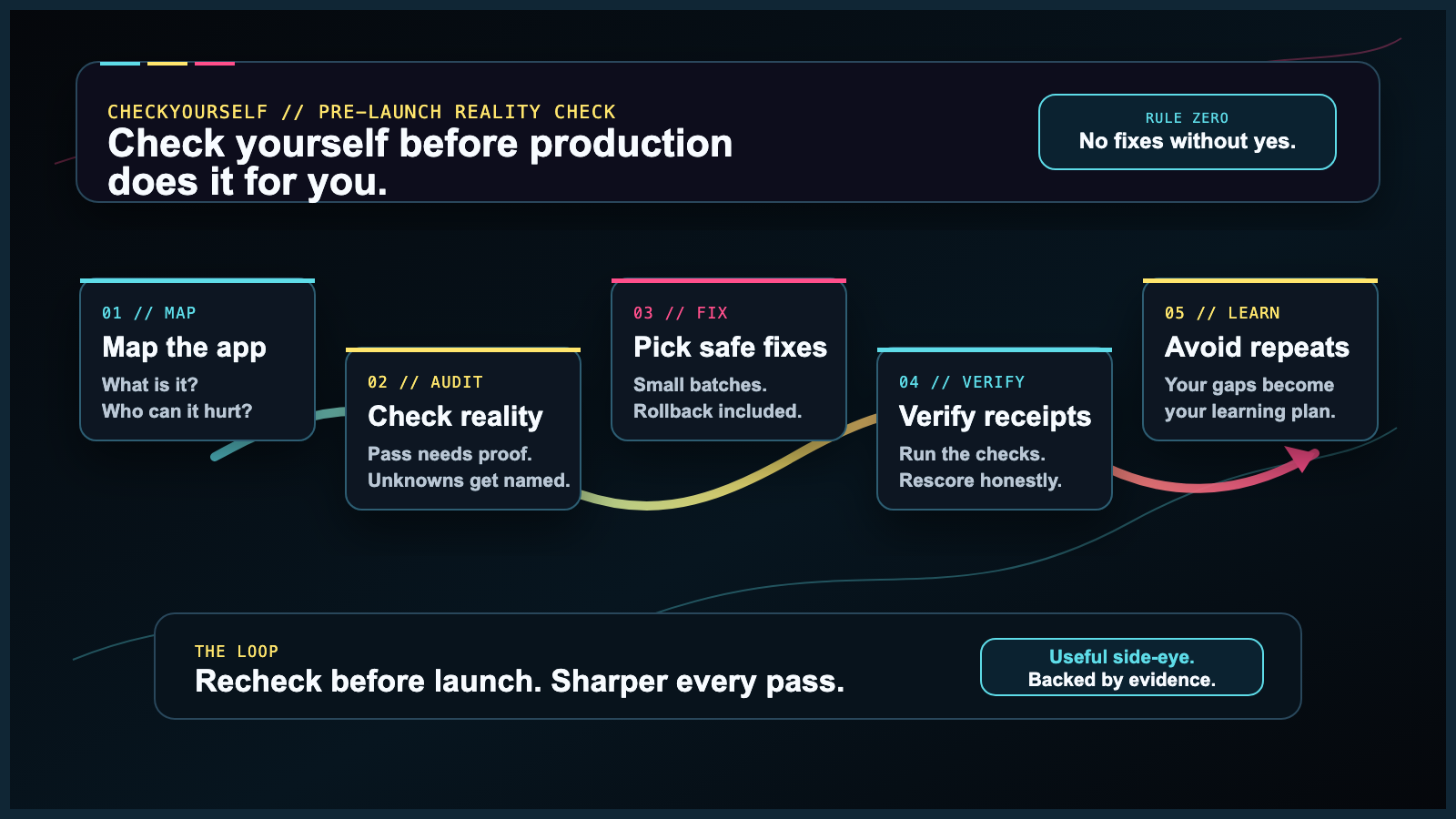
Add the folder → run the audit → review the full backlog → approve fixes → verify → repeat → learn what you missedCheckYourself is not a "top three issues" tool. It creates a complete findings register and a complete remediation backlog. The first approval batch is intentionally small so fixes stay safe, understandable, and reversible.
What it produces
Default outputs (see a real example in samples/sample-production-reality-report.md):
- Project Map — what your app appears to do.
- Detected Stack — framework, database, auth, hosting, tests, deployment signals, and confidence.
- Production Reality Score — a 0–100 score with caps and reasoning (how the score works).
- Coverage Sweep — every relevant production surface marked Pass, Finding, Unknown, or Not applicable.
- Complete Findings Register — every discovered risk, not just the obvious ones.
- Complete Remediation Backlog — every finding and blocking unknown ranked by severity, safety, and dependency order.
- Safest First Approval Batch — the first reversible batch to approve, not the whole scope.
- Guided Fix Loop — approve, fix, verify, rescore, repeat.
- Bespoke Learning Plan — what to learn next based on what your own app was missing.
Optional output:
- Human Audit Dashboard — one self-contained HTML/CSS dashboard that visualizes the score, risks, backlog, coverage, status, and learning plan. It is optional because dashboards use extra tokens. Ask for it with
dashboard yes. If you do not want HTML, use the compact inline Markdown dashboard instead.
What it checks
The diagnostic sweeps the whole relevant production surface:
- product purpose, users, and harm model;
- frontend UX, accessibility, and client safety;
- API/backend behavior, validation, uploads, and webhooks;
- auth, permissions, sessions, roles, and admin paths;
- data storage, migrations, backups, and tenant/user isolation;
- secrets, environment variables, and runtime configuration;
- tests, quality gates, and regression coverage;
- CI/CD, supply chain, dependencies, and release safety;
- deployment, rollback, hosting, and environments;
- observability, logs, errors, alerts, and incident response;
- performance, scaling, caching, and rate limits;
- privacy, compliance, data retention, and consent;
- AI/RAG/agent governance when applicable.
The full technical engine lives in 90_ADVANCED/, but users do not need to read it first.
Works with every AI coding tool
CheckYourself is model-agnostic and ships as plain Markdown, so it runs in any AI assistant that can read text or files:
| Category | Tools |
|---|---|
| AI IDEs & editors | Cursor, Windsurf, GitHub Copilot, Codex |
| Chat assistants | ChatGPT, Claude, Gemini |
| App builders | Replit, Lovable, Bolt |
| Local & custom agents | any local model or agent that reads files |
Tool-specific setup guides live in 06_ADAPTERS/.
Who it is for
CheckYourself is for people who build with AI and want reality before production does the grading:
- beginners learning by doing;
- intermediate builders who can ship but want a safer second pass;
- experienced developers who want a reusable audit context;
- AI-built app learners and community builders;
- Cursor, Windsurf, Replit, Lovable, Bolt, ChatGPT, Claude, Gemini, Codex, and local-agent users;
- founders, freelancers, agencies, and teams preparing real launches.
How it works
CheckYourself runs as a staged workflow, each stage with its own context file so your AI tool always knows what to read, do, and produce:
- Project context — the agent maps what your app does and detects the stack.
- Run diagnostic — a read-only sweep produces the Production Reality Report and score.
- Guided fix mode — you approve fixes in safe batches; the agent applies and verifies them.
- Learning plan — the agent writes a plan from the real gaps it found.
- Dashboard (optional) — a self-contained HTML or inline Markdown view of everything.
Each stage is defined by its own context files, scoring rules, schemas, and templates — so the agent always knows what to read, what to do, and what to produce. The advanced engine in 90_ADVANCED/ deepens any stage when a domain warrants it.
Optional local CLI
For a zero-token head start, CheckYourself ships a small optional scan & scaffold CLI — standard library only, no network, no secret values printed:
python3 tools/checkyourself.py /path/to/your/projectIt detects your stack, flags obvious deterministic risks (possible hardcoded secrets, a committed .env, missing .env.example, absent tests or CI) ranked P0–P3, and writes a pre-filled context file your AI can build on. Add --json for a machine-readable summary, --format json --no-write for JSON stdout, or --ci to use it as a lightweight pipeline gate (non-zero exit on a P0). The CLI is a scaffold, not a substitute — the AI still runs the full diagnostic. See docs/cli.md.
The agent-access roadmap is CLI-first: no hosted API for the current open-source product, with MCP planned later as a thin native-agent wrapper. See docs/agent-access-cli-plan.md.
Optional visual dashboard
The Markdown report is the default output because it is cheaper, faster, and easier for most AI tools to produce.
This repository includes a real dogfood dashboard screenshot from CheckYourself auditing itself:

After the report exists, say:
dashboard yesThe AI creates one self-contained HTML/CSS dashboard from the report — it should not re-run the audit just to make the dashboard. If you do not want HTML, ask for:
dashboard inlineand the AI returns the compact Markdown dashboard shape instead of creating a file.
Dashboard files:
10_DASHBOARD/README.md10_DASHBOARD/dashboard-data-contract.md- [
10_DASHBOARD/inline-dashboard.md](10_DA
…