Local FAISS MCP Server
<!-- mcp-name: io.github.nonatofabio/local-faiss-mcp -->



A Model Context Protocol (MCP) server that provides local vector database functionality using FAISS for Retrieval-Augmented Generation (RAG) applications.
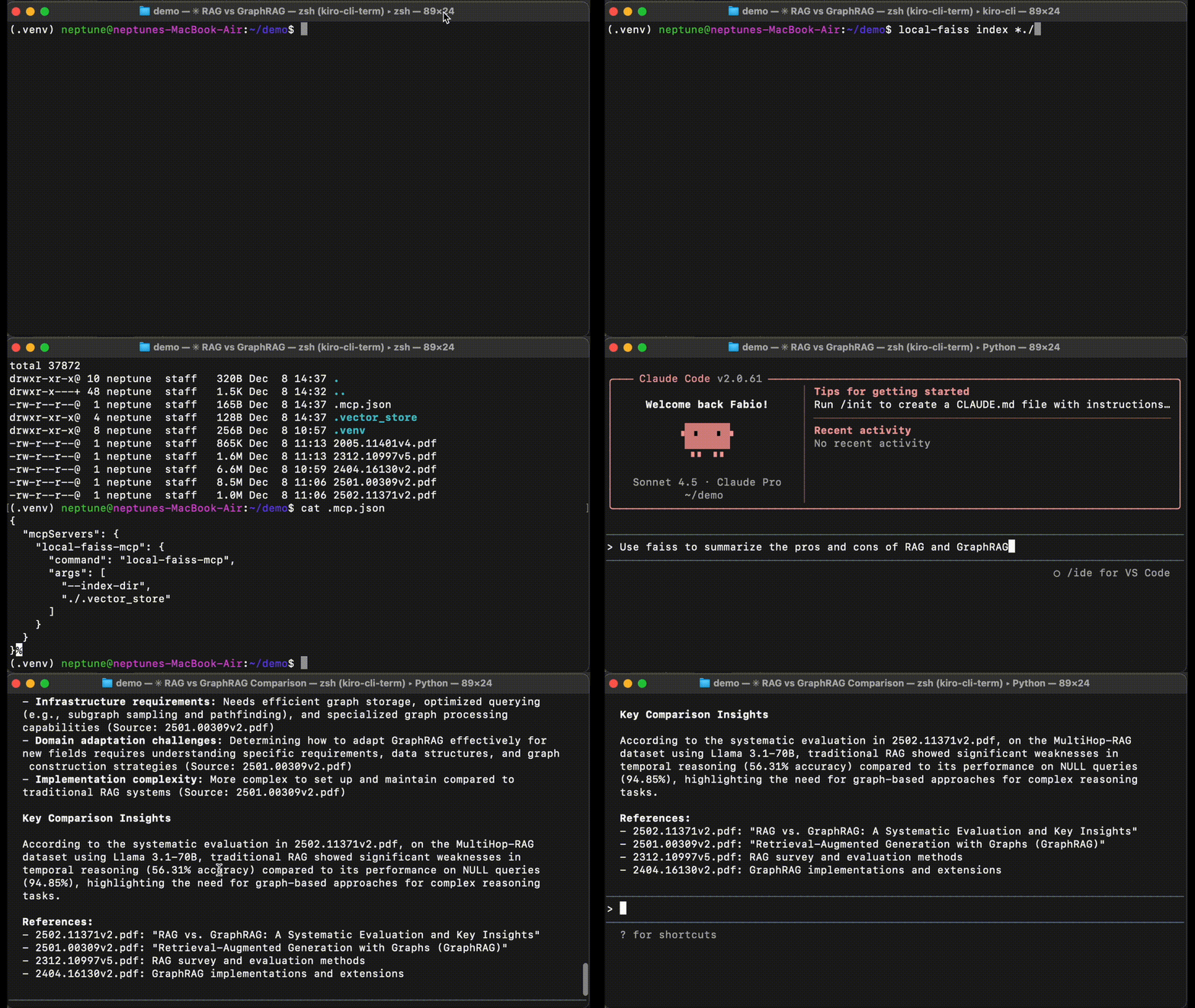
Features
Core Capabilities
- Local Vector Storage: Uses FAISS for efficient similarity search without external dependencies
- Document Ingestion: Automatically chunks and embeds documents for storage
- Semantic Search: Query documents using natural language with sentence embeddings
- Persistent Storage: Indexes and metadata are saved to disk
- MCP Compatible: Works with any MCP-compatible AI agent or client
v0.2.0 Highlights
- CLI Tool:
local-faisscommand for standalone indexing and search - Document Formats: Native PDF/TXT/MD support, DOCX/HTML/EPUB with pandoc
- Re-ranking: Two-stage retrieve and rerank for better results
- Custom Embeddings: Choose any Hugging Face embedding model
- MCP Prompts: Built-in prompts for answer extraction and summarization
Quickstart
# Install
pip install local-faiss-mcp

# Index documents
local-faiss index document.pdf

# Search
local-faiss search "What is this document about?"Or use with Claude Code - configure MCP client (see Configuration) and try:
Use the ingest_document tool with: ./path/to/document.pdf
Then use query_rag_store to search for: "How does FAISS perform similarity search?"Claude will retrieve relevant document chunks from your vector store and use them to answer your question.
Installation
⚡️ Upgrading? Run pip install --upgrade local-faiss-mcp
From PyPI (Recommended)
pip install local-faiss-mcpOptional: Extended Format Support
For DOCX, HTML, EPUB, and 40+ additional formats, install pandoc:
# macOS
brew install pandoc

# Linux
sudo apt install pandoc

# Or download from: https://pandoc.org/installing.htmlNote: PDF, TXT, and MD work without pandoc.
From Source
git clone https://github.com/nonatofabio/local_faiss_mcp.git
cd local_faiss_mcp
pip install -e .Usage
Running the Server
After installation, you can run the server in three ways:
1. Using the installed command (easiest):
local-faiss-mcp --index-dir /path/to/index/directory2. As a Python module:
python -m local_faiss_mcp --index-dir /path/to/index/directory3. For development/testing:
python local_faiss_mcp/server.py --index-dir /path/to/index/directoryCommand-line Arguments:
--index-dir: Directory to store FAISS index and metadata files (default: current directory)--embed: Hugging Face embedding model name (default:all-MiniLM-L6-v2)--rerank: Enable re-ranking with specified cross-encoder model (default:BAAI/bge-reranker-base)
Using a Custom Embedding Model:
# Use a larger, more accurate model
local-faiss-mcp --index-dir ./.vector_store --embed all-mpnet-base-v2

# Use a multilingual model
local-faiss-mcp --index-dir ./.vector_store --embed paraphrase-multilingual-MiniLM-L12-v2

# Use any Hugging Face sentence-transformers model
local-faiss-mcp --index-dir ./.vector_store --embed sentence-transformers/model-nameUsing Re-ranking for Better Results:
Re-ranking uses a cross-encoder model to reorder FAISS results for improved relevance. This two-stage "retrieve and rerank" approach is common in production search systems.
# Enable re-ranking with default model (BAAI/bge-reranker-base)
local-faiss-mcp --index-dir ./.vector_store --rerank

# Use a specific re-ranking model
local-faiss-mcp --index-dir ./.vector_store --rerank cross-encoder/ms-marco-MiniLM-L-6-v2

# Combine custom embedding and re-ranking
local-faiss-mcp --index-dir ./.vector_store --embed all-mpnet-base-v2 --rerank BAAI/bge-reranker-baseHow Re-ranking Works:
- FAISS retrieves top candidates (10x more than requested)
- Cross-encoder scores each candidate against the query
- Results are re-sorted by relevance score
- Top-k most relevant results are returned
Popular re-ranking models:
BAAI/bge-reranker-base- Good balance (default)cross-encoder/ms-marco-MiniLM-L-6-v2- Fast and efficientcross-encoder/ms-marco-TinyBERT-L-2-v2- Very fast, smaller model
The server will:
- Create the index directory if it doesn't exist
- Load existing FAISS index from
{index-dir}/faiss.index(or create a new one) - Load document metadata from
{index-dir}/metadata.json(or create new) - Listen for MCP tool calls via stdin/stdout
Available Tools
The server provides two tools for document management:
1. ingest_document
Ingest a document into the vector store.
Parameters:
document(required): Text content OR file path to ingestsource(optional): Identifier for the document source (default: "unknown")
Auto-detection: If document looks like a file path, it will be automatically parsed.
Supported formats:
- Native: TXT, MD, PDF
- With pandoc: DOCX, ODT, HTML, RTF, EPUB, and 40+ formats
Examples:
{
  "document": "FAISS is a library for efficient similarity search...",
  "source": "faiss_docs.txt"
}{
"document": "./documents/research_paper.pdf"
}2. query_rag_store
Query the vector store for relevant document chunks.
Parameters:
query(required): The search query texttop_k(optional): Number of results to return (default: 3)
Example:
{
  "query": "How does FAISS perform similarity search?",
  "top_k": 5
}Available Prompts
The server provides MCP prompts to help extract answers and summarize information from retrieved documents:
1. extract-answer
Extract the most relevant answer from retrieved document chunks with proper citations.
Arguments:
query(required): The original user query or questionchunks(required): Retrieved document chunks as JSON array with fields:text,source,distance
Use Case: After querying the RAG store, use this prompt to get a well-formatted answer that cites sources and explains relevance.
Example workflow in Claude:
- Use
query_rag_storetool to retrieve relevant chunks - Use
extract-answerprompt with the query and results - Get a comprehensive answer with citations
2. summarize-documents
Create a focused summary from multiple document chunks.
Arguments:
topic(required): The topic or theme to summarizechunks(required): Document chunks to summarize as JSON arraymax_length(optional): Maximum summary length in words (default: 200)
Use Case: Synthesize information from multiple retrieved documents into a concise summary.
Example Usage:
In Claude Code, after retrieving documents with query_rag_store, you can use the prompts like:
Use the extract-answer prompt with:
- query: "What is FAISS?"
- chunks: [the JSON results from query_rag_store]The prompts will guide the LLM to provide structured, citation-backed answers based on your vector store data.
Command-Line Interface
The local-faiss CLI provides standalone document indexing and search capabilities.
Index Command
Index documents from the command line:
# Index single file
local-faiss index document.pdf

# Index multiple files
local-faiss index doc1.pdf doc2.txt doc3.md

# Index all files in folder
local-faiss index documents/

# Index recursively
local-faiss index -r documents/

# Index with glob pattern
local-faiss index "docs/**/*.pdf"Configuration: The CLI automatically uses MCP configuration from:
./.mcp.json(local/project-specific)~/.claude/.mcp.json(Claude Code config)~/.mcp.json(fallback)
If no config exists, creates ./.mcp.json with default settings (./.vector_store).
Supported formats:
- Native: TXT, MD, PDF (always available)
- With pandoc: DOCX, ODT, HTML, RTF, EPUB, etc.
- Install:
brew install pandoc(macOS) orapt install pandoc(Linux)
- Install:
Search Command
Search the indexed documents:
# Basic search
local-faiss search "What is FAISS?"

# Get more results
local-faiss search -k 5 "similarity search algorithms"Results show:
- Source file path
- FAISS distance score
- Re-rank score (if enabled in MCP config)
- Text preview (first 300 characters)
CLI Features
- ✅ Incremental indexing: Adds to existing index, doesn't overwrite
- ✅ Progress output: Shows indexing progress for each file
- ✅ Shared config: Uses same settings as MCP server
- ✅ Auto-detection: Supports glob patterns and recursive folders
- ✅ Format support: Handles PDF, TXT, MD natively; DOCX+ with pandoc
Configuration with MCP Clients
Claude Code
Add this server to your Claude Code MCP configuration (.mcp.json):
User-wide configuration (~/.claude/.mcp.json):
{
  "mcpServers": {
    "local-faiss-mcp": {
      "command": "local-faiss-mcp"
    }
  }
}With custom index directory:
{
  "mcpServers": {
    "local-faiss-mcp": {
      "command": "local-faiss-mcp",
      "args": [
        "--index-dir",
        "/home/user/vector_indexes/my_project"
      ]
    }
  }
}With custom embedding model:
{
  "mcpServers": {
    "local-faiss-mcp": {
      "command": "local-faiss-mcp",
      "args": [
        "--index-dir",
        "./.vector_store",
        "--embed",
        "all-mpnet-base-v2"
      ]
    }
  }
}With re-ranking enabled:
{
  "mcpServers": {
    "local-faiss-mcp": {
      "command": "local-faiss-mcp",
      "args": [
        "--index-dir",
        "./.vector_store",
        "--rerank"
      ]
    }
  }
}Full configuration with embedding and re-ranking:
{
  "mcpServers": {
    "local-faiss-mcp": {
      "command": "local-faiss-mcp",
      "args": [
        "--index-dir",
        "./.vector_store",
        "--embed",
        "all-mpnet-base-v2",
        "--rerank",
        "BAAI/bge-reranker-base"
      ]
    }
  }
}Project-specific configuration (./.mcp.json in your project):
{
  "mcpServers": {
    "local-faiss-mcp": {
      "command": "local-faiss-mcp",
      "args": [
        "--index-dir",
        "./.vector_store"
      ]
    }
  }
}Alternative: Using Python module (if the command isn't in PATH):
{
  "mcpServers": {
    "local-faiss-mcp": {
      "command": "python",
      "args": ["-m", "local_faiss_mcp", "--index-dir", "./.vector_store"]
    }
  }
}Claude Desktop
Add this server to your Claude Desktop configuration:
{
  "mcpServers": {
    "local-faiss-mcp": {
      "command": "local-faiss-mcp",
      "args": ["--index-dir", "/path/to/index/directory"]
    }
  }
}Architecture
- Embedding Model: Configurable via
--embedflag (default:all-MiniLM-L6-v2with 384 dimensions)- Supports any Hugging Face sentence-transformers model
- Automatically detects embedding dimensions
- Model choice persisted with the index
- Index Type: FAISS IndexFlatL2 for exact L2 distance search
- Chunking: Documents are split into ~500 word chunks with 50 word overlap
- Storage: Index saved as
faiss.index, metadata saved asmetadata.json
Choosing an Embedding Model
Different models offer different trade-offs:
| Model | Dimensions | Speed | Quality | Use Case |
|---|---|---|---|---|
all-MiniLM-L6-v2 |
…