Infrawise gives AI coding assistants deterministic infrastructure awareness.
It statically analyzes your codebase, cloud infrastructure, and database schemas, then exposes that context through MCP so tools like Claude Code can understand your actual tables, indexes, query patterns, and service relationships instead of guessing from source files alone.
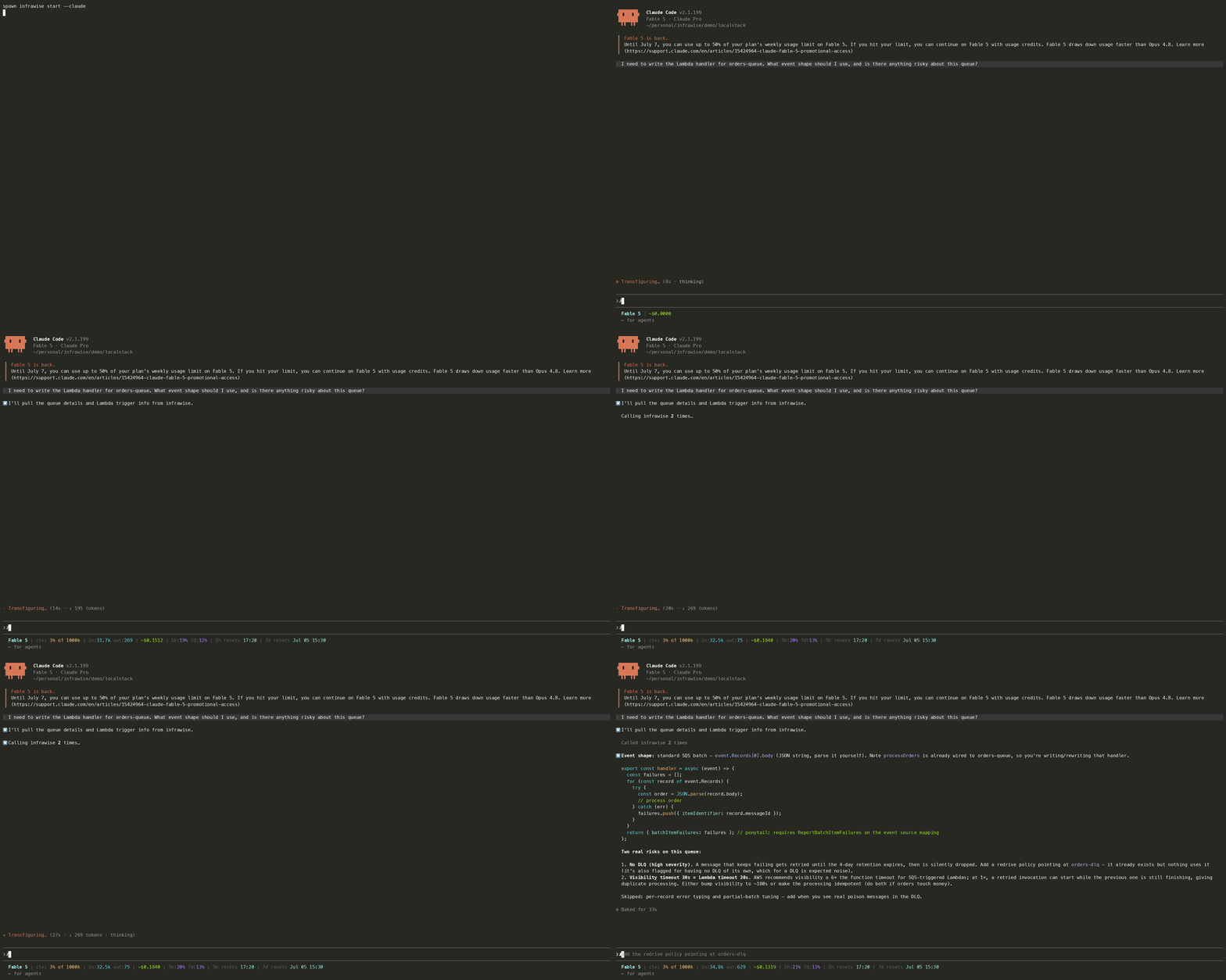
Why this exists
New software developers don't write wrong code. Claude Code writes wrong code and they ship it. Infrawise is the only thing standing between Claude Code's generated output and a production incident.
AI coding assistants can read your source files but have no deterministic knowledge of your infrastructure. They do not know which GSIs exist, how tables are partitioned, which functions already trigger scans, or where indexes are missing. So they guess.
Infrawise replaces guessing with infrastructure-aware context.
Without Infrawise, an AI assistant might:
- Suggest a
.scan()on your Orders table that has 50M rows - Recommend adding a GSI on
statusthat you already have - Write a
SELECT *when you need to keep query cost low - Not notice that 5 functions are already hammering the same partition key
With Infrawise, it knows:
- Your exact table schemas, partition keys, sort keys, and GSIs
- Which functions query which tables and how
- Which patterns are already flagged as high severity
- The exact
CREATE INDEXSQL or GSI config for your tables — not generic advice
What Infrawise is not
Infrawise is not an AI agent framework, an infrastructure provisioning tool, an observability platform, or a cloud management dashboard.
It is a deterministic infrastructure intelligence layer for AI-assisted development.
Installation
Requires Node.js 22 or later (node --version).
npm install -g infrawiseor use without installing:
npx infrawise start --claudeQuick start
cd your-project
infrawise start --claudeThat's it. Infrawise will:
- Probe your environment and generate
infrawise.yaml(first time only — asks which AWS profile to use only if you have several) - Scan your AWS services, databases, and codebase
- Write
.mcp.jsonso your editor auto-connects on every future launch - Open Claude Code with all 22 MCP tools ready
Every time after:
claude # no infrawise command needed — editor manages the connectionAnalysis is cached for 24 hours. When the cache is stale, infrawise serve --stdio (spawned automatically by your editor) refreshes it at session start. File changes are detected within the session and the code graph is updated automatically.
Findings (3 total)

1. [HIGH] Full table scan detected on DynamoDB table "Orders"
   listAllOrders() scans without any filter — reads every item in the table.
   Recommendation: Replace Scan with Query using a partition key or add a GSI.

2. [MEDIUM] PostgreSQL table "users" has no index on column "email"
   Filtering on "email" causes sequential scans.
   Recommendation: CREATE INDEX CONCURRENTLY idx_users_email ON users(email);

3. [MEDIUM] DynamoDB table "Sessions" accessed by 6 distinct code paths
High access concentration may create hot partition issues at scale.Using with AI coding assistants
Claude Code (recommended)
infrawise start --claudeWrites .mcp.json to your project root (merging with any MCP servers already configured there) and opens Claude Code. Claude Code reads .mcp.json automatically on every launch and manages the infrawise serve --stdio process — no server to start, no ports to configure.
Cursor
infrawise start --cursorWrites .cursor/mcp.json (merging with any existing MCP servers) and opens Cursor. All 22 infrawise tools are available in Cursor's MCP panel.
VS Code
infrawise start --vscodeWrites .vscode/mcp.json (merging with any existing MCP servers) and opens VS Code. The tools are available to Copilot agent mode via the MCP servers panel.
Any editor (no flag)
infrawise startWrites .mcp.json (merging with any existing MCP servers) and exits. Open whichever editor you prefer — point it at infrawise serve --stdio --config /path/to/infrawise.yaml as an MCP server command.
HTTP transport (alternative)
If your editor or workflow requires an HTTP MCP endpoint instead of stdio:
infrawise serve # starts server at http://localhost:3000/mcpAdd to your editor's MCP config:
{
  "mcpServers": {
    "infrawise": {
      "url": "http://localhost:3000/mcp"
    }
  }
}MCP tools
| Tool | What it provides |
|---|---|
get_infra_overview | Complete snapshot — services, counts, high-severity findings, configured flag (data age and per-source status ride the dataHealth block on every response) |
get_graph_summary | Full infrastructure graph — all nodes, edges, and findings |
get_table_schema | Column-level schema for named tables/collections — types, PKs, FKs, indexes, DynamoDB keys/billing mode, cost signal (no row data) |
analyze_function | Issues in a specific function — scans, missing indexes, N+1, trigger event shapes, missing IAM permissions; returns every same-named file as a separate match |
suggest_gsi | Exact GSI config for a DynamoDB table + attribute — names the existing index instead when one already covers it |
postgres_index_suggestions | Exact CREATE INDEX SQL for your actual table |
suggest_mongo_index | Exact createIndex command for a MongoDB collection + field |
mysql_index_suggestions | Exact ALTER TABLE ADD INDEX SQL for your MySQL table |
get_queue_details | SQS queues — DLQ status, encryption, FIFO type, visibility timeout, message counts |
get_api_routes | API Gateway APIs (REST, HTTP, WebSocket) — routes, HTTP methods, paths, and Lambda integrations |
get_topic_details | SNS topics — subscription counts, protocols, and filter policies (required message attributes per subscription) |
get_secrets_overview | Secrets Manager — names, rotation status, and key names inferred from code (values never included) |
get_parameter_overview | SSM Parameter Store — names, types, tiers (values never included) |
get_lambda_overview | Lambda functions — runtime, memory, timeout, execution role ARN, triggers (SQS/SNS/DynamoDB/Kinesis/MSK/EventBridge/S3), env var key names, cost signal |
get_eventbridge_details | EventBridge rules — name, state, schedule/event pattern, target functions |
get_s3_overview | S3 buckets — versioning, encryption, public access, event notifications |
get_log_errors | CloudWatch error patterns and counts (no raw log messages) |
get_stack_outputs | Stack outputs and cross-stack exports parsed from local IaC files, with staleness flags for orphaned cdk.out templates |
get_cognito_overview | Cognito user pools — MFA config, app client auth flows, OAuth settings, token validity (secrets never included) |
get_stream_details | Kinesis streams (shards, retention, capacity mode) and MSK clusters (state, Kafka version, brokers) |
get_cache_overview | ElastiCache clusters — engine, encryption in transit/at rest, replication group, failover, cost signal (data never read) |
get_cloudfront_overview | CloudFront distributions — per-behavior path patterns, origins (S3 vs custom, resolved API Gateway name), cache policy, viewer protocol policy |
Every response carries a dataHealth block with a fixed shape: when the infrastructure was read and how long ago, the status of each source behind that answer, whether cdk.out has been synthed since, and the command that refreshes. Every key is always present, so nothing has to be inferred from a field's absence — an empty result you can't distinguish from a failed one reads as "no queues need a DLQ" when the truth is "SQS was never listed".
Infrawise reports; it doesn't rule. Pass maxAgeSeconds when a question is point-in-time and the answer tells you whether the data meets it (advisory — the data still comes back, marked). A running server rechecks the cache on each tool call, so an open session picks up a fresh infrawise analyze on its next question, without a restart. infrawise analyze and infrawise check print the same source warnings and stop calling a run clean when any source went unread.
Age is a proxy for drift, not drift itself — a three-day-old snapshot of an untouched account is accurate, and a five-minute-old one taken before a terraform apply isn't. How Infrawise handles staleness covers where that proxy misleads and what to do about it; the data freshness reference is the field-by-field table and the freshness config key.
CLI reference
| Command | What it does |
|---|---|
infrawise start | Primary command — probe env, generate config, analyze, write editor MCP config |
infrawise start --claude | Same as above, then opens Claude Code |
…