VictoriaLogs MCP Server


The implementation of Model Context Protocol (MCP) server for VictoriaLogs.
This provides access to your VictoriaLogs instance and seamless integration with VictoriaLogs APIs and documentation. It can give you a comprehensive interface for logs, observability, and debugging tasks related to your VictoriaLogs instances, enable advanced automation and interaction capabilities for engineers and tools.
Features
This MCP server allows you to use almost all read-only APIs of VictoriaLogs, i.e. all functions available in Web UI:
- Querying logs and exploring logs data
- Showing parameters of your VictoriaLogs instance
- Listing available streams, fields, field values
- Query statistics for the logs as metrics
- UI with setup instructions and tools inspection on the root endpoint (only in Streamable HTTP mode)
In addition, the MCP server contains embedded up-to-date documentation and is able to search it without online access.
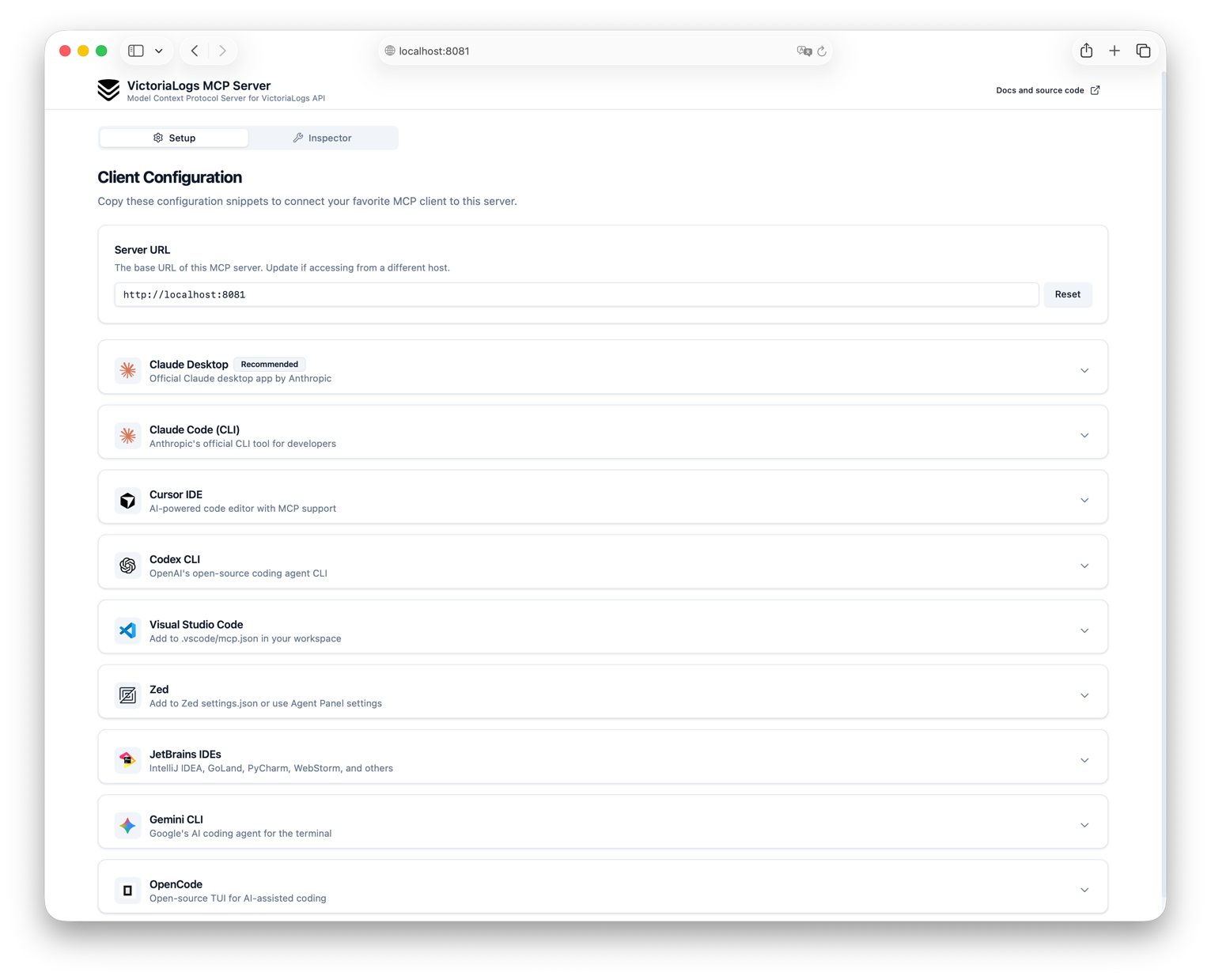
More details about the exact available tools and prompts can be found in the Usage section.
You can combine functionality of tools, docs search in your prompts and invent great usage scenarios for your VictoriaLogs instance. And please note the fact that the quality of the MCP Server and its responses depends very much on the capabilities of your client and the quality of the model you are using.
You can also combine the MCP server with other observability or doc search related MCP Servers and get even more powerful results.
Try without installation
There is a publicly available instance of the VictoriaMetrics MCP Server that you can use to test the features without installing it:
https://play-vmlogs-mcp.victoriametrics.com/mcpAttention! This URL is not supposed to be opened in a browser, it is intended to be used in MCP clients.
It's available in Streamable HTTP Mode mode and configured to work with Public VictoriaLogs Playground.
Here is example of configuration for Claude Desktop:
Requirements
- VictoriaLogs instance: (single-node or cluster)
- Go 1.26 or higher (if you want to build from source)
Installation
Go
go install github.com/VictoriaMetrics/mcp-victorialogs/cmd/mcp-victorialogs@latestBinaries
Just download the latest release from Releases page and put it to your PATH.
Example for Linux x86_64 (note that other architectures and platforms are also available):
latest=$(curl -s https://api.github.com/repos/VictoriaMetrics/mcp-victorialogs/releases/latest | grep 'tag_name' | cut -d\" -f4)
wget https://github.com/VictoriaMetrics/mcp-victorialogs/releases/download/$latest/mcp-victorialogs_Linux_x86_64.tar.gz
tar axvf mcp-victorialogs_Linux_x86_64.tar.gzDocker
You can run VictoriaLogs MCP Server using Docker.
This is the easiest way to get started without needing to install Go or build from source.
docker run -d --name mcp-victorialogs \
  -e VL_INSTANCE_ENTRYPOINT=https://play-vmlogs.victoriametrics.com \
  -e MCP_SERVER_MODE=http \
  -e MCP_LISTEN_ADDR=:8081 \
  -p 8081:8081 \
ghcr.io/victoriametrics/mcp-victorialogsYou should replace environment variables with your own parameters.
Note that the MCP_SERVER_MODE=http flag is used to enable Streamable HTTP mode.
More details about server modes can be found in the Configuration section.
See available docker images in github registry.
Also see Using Docker instead of binary section for more details about using Docker with MCP server with clients in stdio mode.
Source Code
For building binary from source code you can use the following approach:
-
Clone repo:
git clone https://github.com/VictoriaMetrics/mcp-victorialogs.git cd mcp-victorialogs -
Build binary from cloned source code:
make build # after that you can find binary mcp-victorialogs and copy this file to your PATH or run inplace -
Build image from cloned source code:
docker build -t mcp-victorialogs .
# after that you can use docker image mcp-victorialogs for running or pushing
Helm
Check out VictoriaLogs MCP Server Helm chart documentation for more details about installation using Helm.
Configuration
MCP Server for VictoriaLogs is configured via environment variables:
| Variable | Description | Required | Default | Allowed values |
|---|---|---|---|---|
VL_INSTANCE_ENTRYPOINT | URL to VictoriaLogs instance | Yes | - | - |
VL_INSTANCE_BEARER_TOKEN | Authentication token for VictoriaLogs API | No | - | - |
VL_INSTANCE_HEADERS | Custom HTTP headers to send with requests (comma-separated key=value pairs) | No | - | - |
MCP_PASSTHROUGH_HEADERS | HTTP header names to forward from incoming MCP requests to VictoriaLogs (comma-separated list). Overrides VL_INSTANCE_HEADERS on collision. Only applies in sse/http modes. | No | - | - |
VL_DEFAULT_TENANT_ID | Default tenant ID used when tenant is not specified in requests (format: AccountID:ProjectID or AccountID) | No | 0:0 | - |
MCP_SERVER_MODE | Server operation mode. See Modes for details. | No | stdio | stdio, sse, http |
MCP_LISTEN_ADDR | Address for SSE or HTTP server to listen on | No | localhost:8081 | - |
MCP_DISABLED_TOOLS | Comma-separated list of tools to disable | No | - | - |
MCP_HEARTBEAT_INTERVAL | Defines the heartbeat interval for the streamable-http protocol. <br /> It means the MCP server will send a heartbeat to the client through the GET connection, <br /> to keep the connection alive from being closed by the network infrastructure (e.g. gateways) | No | 30s | - |
MCP_LOG_FORMAT | Log output format | No | text | text, json |
MCP_LOG_LEVEL | Minimum log level | No | info | debug, info, warn, error |
Modes
MCP Server supports the following modes of operation (transports):
stdio- Standard input/output mode, where the server reads commands from standard input and writes responses to standard output. This is the default mode and is suitable for local servers.sse- Server-Sent Events. Server will expose the/sseand/messageendpoints for SSE connections.http- Streamable HTTP. Server will expose the/mcpendpoint for HTTP connections.
More info about transports you can find in MCP docs:
Сonfiguration examples
# For a public playground
export VL_INSTANCE_ENTRYPOINT="https://play-vmlogs.victoriametrics.com"

# Custom headers for authentication (e.g., behind a reverse proxy)
# Expected syntax is key=value separated by commas
export VL_INSTANCE_HEADERS="<HEADER>=<HEADER_VALUE>,<HEADER>=<HEADER_VALUE>"

# Forward specific headers from incoming MCP requests to VictoriaLogs
export MCP_PASSTHROUGH_HEADERS="X-Token,X

…