[!CAUTION] Public development is currently suspended as no active community formed. We are working on a follow-up project, specifically for the yFiles API. You can read more, here: yFiles MCP Server. yFiles developers can use the MCP to query API, development guides, source code snippets and recipes using those tools, instead. They work far better than the implementation in this repository.

MCP-Typescribe - an MCP Server providing LLMs API information
The Problem
Large Language Models (LLMs) have made incredible strides in code generation and developer productivity. However, they face a key limitation: they can only reliably use APIs and libraries they’ve seen during training. This creates a bottleneck for adopting new tools, SDKs, or internal APIs — LLMs simply don’t know how to use them effectively.
While tools can be given source code access (when interacting with APIs for which the sources are available) or access to documentation files (e.g. typescript type definition files), this doesn't scale well for large APIs. LLMs need a more efficient way to learn more about an API. Putting all the documentation into context for every request is inefficient, unfeasible, and leads to poor results.
As a result:
Larger new or internal APIs remain "invisible" to LLMs.
Developers must manually guide LLMs or provide example usage.
Innovation is slowed by the lag between an API’s release and its widespread understanding by AI tools.
The Idea
This project is an open-source implementation of the Model Context Protocol (MCP)—a protocol designed to provide LLMs with contextual, real-time access to information. In this case it's the API documentation, and particularly for now in this project TypeScript definitions.
Our goal is to:
Parse TypeScript (and other) definitions into a machine-readable format.
Serve this context dynamically to LLMs through tools like Claude, Cline, Cursor, or Windsurf and other custom interfaces.
Enable agentic behavior by letting LLMs query, plan, and adapt to unfamiliar APIs without retraining.
What This Enables
Plug-and-play API support for LLM-based coding assistants.
Faster onboarding for new or proprietary SDKs.
A step toward more autonomous, context-aware coding agents.
Project Overview
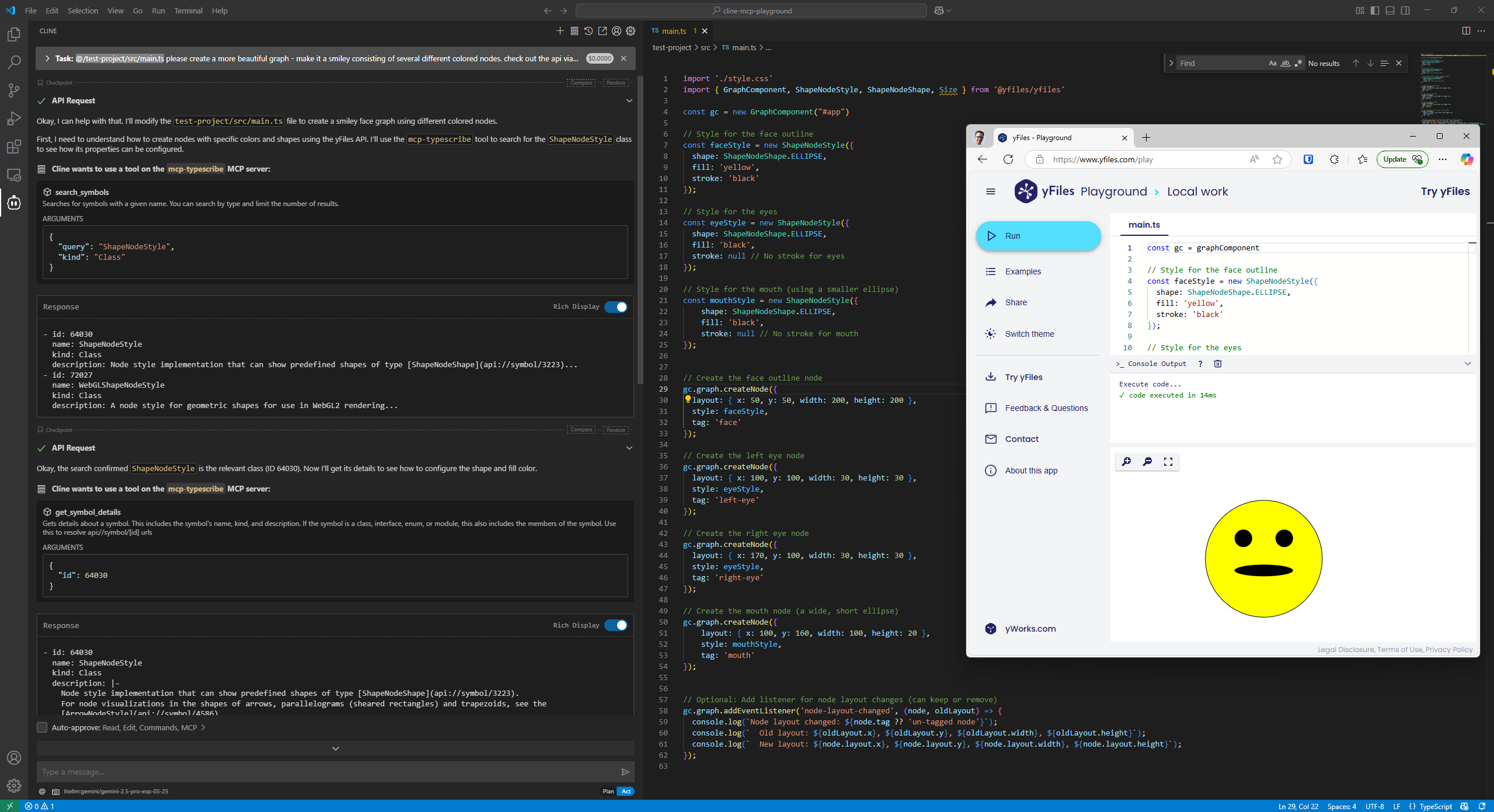
This project provides a way for AI agents to efficiently explore and understand unknown TypeScript APIs. It loads TypeDoc-generated JSON documentation and exposes it through a set of query endpoints that allow agents to search for symbols, get detailed information about specific parts of the API, and understand relationships between different components.
Current Features
- TypeDoc Integration: Loads and indexes TypeDoc JSON documentation for efficient querying
- Comprehensive Query Capabilities: Provides a wide range of tools for exploring TypeScript APIs
- MCP Protocol: Follows the Model Context Protocol for seamless integration with AI agents
Query Capabilities
The server provides the following tools for querying the API:
search_symbols: Find symbols by name with optional filtering by kindget_symbol_details: Get detailed information about a specific symbollist_members: List methods and properties of a class or interfaceget_parameter_info: Get information about function parametersfind_implementations: Find implementations of interfaces or subclassessearch_by_return_type: Find functions returning a specific typesearch_by_description: Search in JSDoc commentsget_type_hierarchy: Show inheritance relationshipsfind_usages: Find where a type/function is used
Getting Started
Prerequisites
- Node.js
- npm
Installation
- Clone the repository
- Install dependencies:
npm install
Usage
-
Generate TypeDoc JSON for your TypeScript API:
npx typedoc --json docs/api.json --entryPointStrategy expand path/to/your/typescript/filesIf you (only) have an existing
.d.tsfile, you can create an api json file like so:Create a separate
tsconfig.docs.json:{ "extends": "./tsconfig.json", "files": ["existing.d.ts"], "typedocOptions": { "entryPoints": ["existing.d.ts"], "json": "docs/api.json", "pretty": false } }Then do
npx typedoc --tsconfig tsconfig.docs.json -
Build the project:
npm run build -
Explore the MCP server:
npx @modelcontextprotocol/inspector node ./dist/mcp-server/cli.js run-server docs/api.json -
Connect an AI agent to the server to query the API
E.g. with cline in VSCode, specify the following MCP server in
cline_mcp_settings.json:{ "mcpServers": { "typescribe": { "command": "npx", "args": [ "-y", "mcp-typescribe@latest", "run-server", "<PATH_TO_API_DOT_JSON>" ], "env": {} } } } -
Enable the server and likely auto-approve the various tools. Tell the agent to use the "typescribe" tool to learn about your API.
Project Structure
src/sample-api/: A sample TypeScript API for testing - it uses a weird German-like dialect for the API names to test that the LLM does not hallucinate the APIsrc/mcp-server/: The MCP server implementationutils/: Utility functionsschemas/: JSON schemas for the MCP toolscore/: Core functionalityserver.ts: The MCP server implementationindex.ts: Entry point for the library exportscli.ts: the entry point for the CLI/binary
tests/: Tests for the API functionality
Development
Running Tests
npm testBuilding
npm run buildLicense
MIT
Copyright 2025 yWorks GmbH - https://www.yworks.com