opengenes-mcp




MCP (Model Context Protocol) server for OpenGenes database
This server implements the Model Context Protocol (MCP) for OpenGenes, providing a standardized interface for accessing aging and longevity research data. MCP enables AI assistants and agents to query comprehensive biomedical datasets through structured interfaces.
The server automatically downloads the latest OpenGenes database and documentation from Hugging Face Hub (specifically from the opengenes folder), ensuring you always have access to the most up-to-date data without manual file management.
The OpenGenes database contains:
- lifespan_change: Experimental data about genetic interventions and their effects on lifespan across model organisms
- gene_criteria: Criteria classifications for aging-related genes (12 different categories)
- gene_hallmarks: Hallmarks of aging associated with specific genes
- longevity_associations: Genetic variants associated with longevity from population studies
If you want to understand more about what the Model Context Protocol is and how to use it more efficiently, you can take the DeepLearning AI Course or search for MCP videos on YouTube.
🏆 Part of Holy Bio MCP Framework
This MCP server is part of the Holy Bio MCP project - a unified framework for bioinformatics research that won the Bio x AI Hackathon 2025 and continues to be actively developed and extended after the victory.
The Holy Bio MCP framework brings together multiple specialized MCP servers into a cohesive ecosystem for advanced biological research:
- gget-mcp - Genomics & sequence analysis toolkit
- opengenes-mcp - Aging & longevity genetics (this server)
- synergy-age-mcp - Synergistic genetic interactions in longevity
- biothings-mcp - Foundational biological data from BioThings.io
- pharmacology-mcp - Drug, target & ligand data
Together, these servers provide 50+ specialized bioinformatics functions that can work seamlessly together in AI-driven research workflows. Learn more about the complete framework at github.com/longevity-genie/holy-bio-mcp.
Usage Example
Here's how the OpenGenes MCP server works in practice with AI assistants:
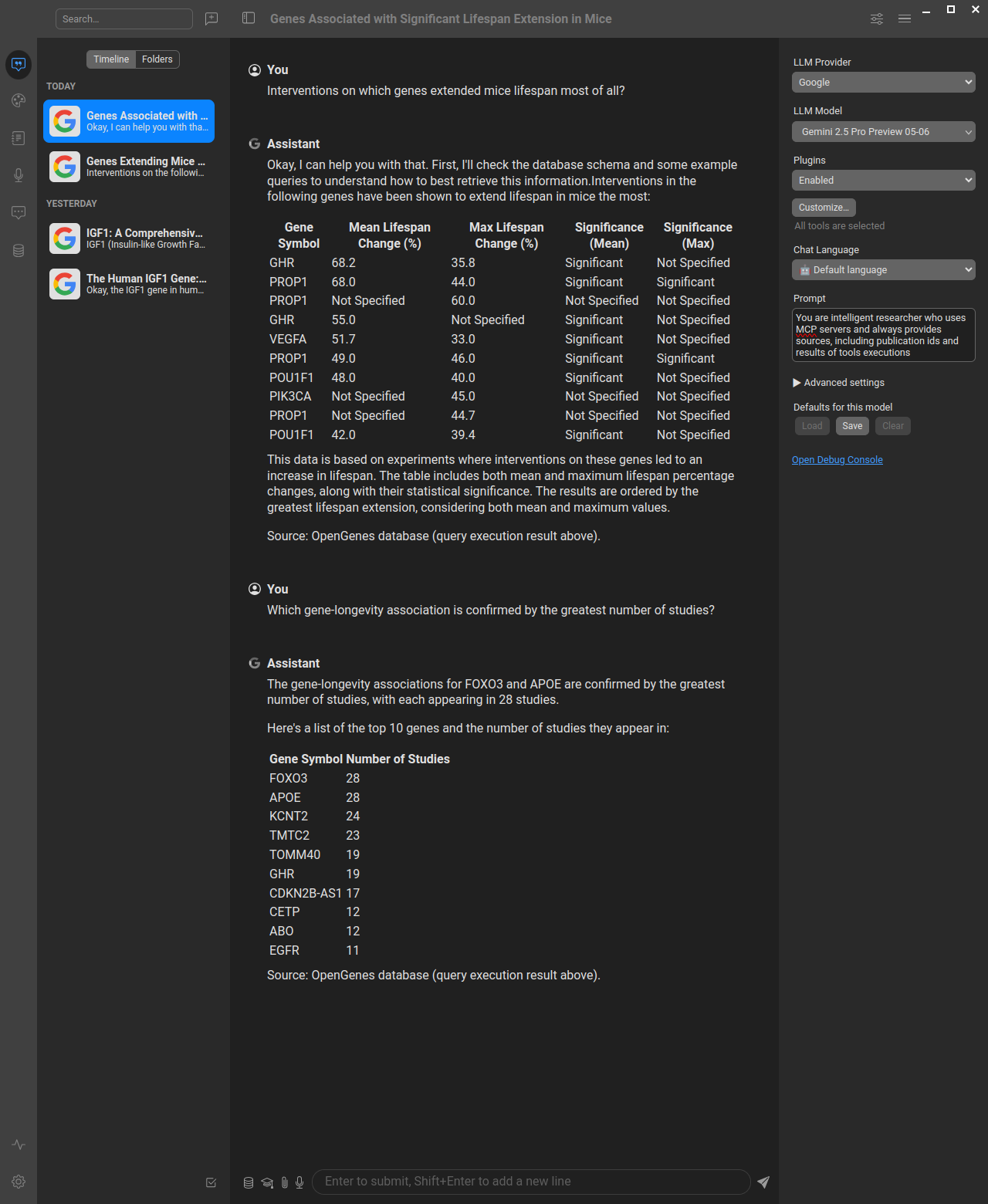
Example showing how to query the OpenGenes database through an AI assistant using natural language, which gets translated to SQL queries via the MCP server. You can use this database both in chat interfaces for research questions and in AI-based development tools (like Cursor, Windsurf, VS Code with Copilot) to significantly improve your bioinformatics productivity by having direct access to aging and longevity research data while coding.
About MCP (Model Context Protocol)
MCP is a protocol that bridges the gap between AI systems and specialized domain knowledge. It enables:
- Structured Access: Direct connection to authoritative aging and longevity research data
- Natural Language Queries: Simplified interaction with specialized databases through SQL
- Type Safety: Strong typing and validation through FastMCP
- AI Integration: Seamless integration with AI assistants and agents
Data Source and Updates
The OpenGenes MCP server automatically downloads data from the longevity-genie/bio-mcp-data repository on Hugging Face Hub. This ensures:
- Always Up-to-Date: Automatic access to the latest OpenGenes database without manual updates
- Reliable Distribution: Centralized data hosting with version control and change tracking
- Efficient Caching: Downloaded files are cached locally to minimize network requests
- Fallback Support: Local fallback files are supported for development and offline use
The data files are stored in the opengenes subfolder of the Hugging Face repository and include:
open_genes.sqlite- The complete OpenGenes databaseprompt.txt- Database schema documentation and usage guidelines
Available Tools
This server provides three main tools for interacting with the OpenGenes database:
opengenes_db_query(sql: str)- Execute read-only SQL queries against the OpenGenes databaseopengenes_get_schema_info()- Get detailed schema information including tables, columns, and enumerationsopengenes_example_queries()- Get a list of example SQL queries with descriptions
Available Resources
resource://db-prompt- Complete database schema documentation and usage guidelinesresource://schema-summary- Formatted summary of tables and their purposes
Quick Start
Installing uv
# Download and install uv
curl -LsSf https://astral.sh/uv/install.sh | sh

# Verify installation
uv --version
uvx --versionuvx is a very nice tool that can run a python package installing it if needed.
Running with uvx
You can run the opengenes-mcp server directly using uvx without cloning the repository:
# Run the server in streamed http mode (default)
uvx opengenes-mcpSTDIO Mode (for MCP clients that require stdio, can be useful when you want to save files)
# Or explicitly specify stdio mode
uvx opengenes-mcp stdioHTTP Mode (Web Server)
# Run the server in streamable HTTP mode on default (3001) port
uvx opengenes-mcp server

# Run on a specific port
uvx opengenes-mcp server --port 8000SSE Mode (Server-Sent Events)
# Run the server in SSE mode
uvx opengenes-mcp sseIn cases when there are problems with uvx often they can be caused by clenaing uv cache:
uv cache cleanThe HTTP mode will start a web server that you can access at http://localhost:3001/mcp (with documentation at http://localhost:3001/docs). The STDIO mode is designed for MCP clients that communicate via standard input/output, while SSE mode uses Server-Sent Events for real-time communication.
Note: Currently, we do not have a Swagger/OpenAPI interface, so accessing the server directly in your browser will not show much useful information. To explore the available tools and capabilities, you should either use the MCP Inspector (see below) or connect through an MCP client to see the available tools.
Configuring your AI Client (Anthropic Claude Desktop, Cursor, Windsurf, etc.)
Quick Configuration Example
Here's what you can copy directly into your Claude Desktop or Cursor MCP configuration:
{
  "mcpServers": {
    "opengenes-mcp": {
      "command": "uvx",
      "args": ["opengenes-mcp"],
      "env": {
        "MCP_TRANSPORT": "stdio"
      }
    }
  }
}Alternative: Using Preconfigured Files
We also provide preconfigured JSON files for different use cases:
- For STDIO mode (recommended): Use
mcp-config-stdio.json - For HTTP mode: Use
mcp-config.json - For local development: Use
mcp-config-stdio-debug.json
Configuration Video Tutorial
For a visual guide on how to configure MCP servers with AI clients, check out our configuration tutorial video for our sister MCP server (biothings-mcp). The configuration principles are exactly the same for the OpenGenes MCP server - just use the appropriate JSON configuration files provided above.
Inspecting OpenGenes MCP server
<details> <summary>Using MCP Inspector to explore server capabilities</summary>If you want to inspect the methods provided by the MCP server, use npx (you may need to install nodejs and npm):
For STDIO mode with uvx:
npx @modelcontextprotocol/inspector --config mcp-config-stdio.json --server opengenes-mcpFor HTTP mode (ensure server is running first):
npx @modelcontextprotocol/inspector --config mcp-config.json --server opengenes-mcpFor local development:
npx @modelcontextprotocol/inspector --config mcp-config-stdio-debug.json --server opengenes-mcpYou can also run the inspector manually and configure it through the interface:
npx @modelcontextprotocol/inspectorAfter that you can explore the tools and resources with MCP Inspector at http://127.0.0.1:6274 (note, if you run inspector several times it can change port)
</details>Integration with AI Systems
Simply point your AI client (like Cursor, Windsurf, ClaudeDesktop, VS Code with Copilot, or others) to use the appropriate configuration file from the repository.
Repository setup
# Clone the repository
git clone https://github.com/longevity-genie/opengenes-mcp.git
cd opengenes-mcp
uv syncRunning the MCP Server
If you already cloned the repo you can run the server with uv:
# Start the MCP server locally (HTTP mode)
uv run server

# Or start in STDIO mode
uv run stdio

# Or start in SSE mode
uv run sseDatabase Schema
<details> <summary>Detailed schema information</summary>Main Tables
- lifespan_change (47 columns): Experimental lifespan data with intervention details across model organisms
- gene_criteria (2 columns): Gene classifications by aging criteria (12 different categories)
- gene_hallmarks (2 columns): Hallmarks of aging mappings for genes
- longevity_associations (11 columns): Population genetics longevity data from human studies
Key Fields
- HGNC: Gene symbol (primary identifier across all tables)
- model_organism: Research organism (mouse, C. elegans, fly, etc.)
- effect_on_lifespan: Direction of lifespan change (increases/decreases/no change)
- intervention_method: Method of genetic intervention (knockout, overexpression, etc.)
- criteria: Aging-related gene classification (12 categories)
- hallmarks of aging: Biological aging processes associated with genes
Example Queries
<details> <summary>Sample SQL queries for common research questions</summary>-- Get top genes with most lifespan experiments
SELECT HGNC, COUNT(*) as experiment_count
FROM lifespan_change
WHERE HGNC IS NOT NULL
GROUP BY HGNC
ORDER BY experiment_count DESC
LIMIT 10;
-- Find genes that increase lifespan in mice
SELECT DISTINCT HGNC, effect_on_lifespan
FROM lifespan_change
WHERE model_organism = 'mouse'
AND effect_on_lifespan = 'increases lifespan'
AND HGNC IS NOT NULL;
-- Get hallmarks of aging for genes
SELECT HGNC, "hallmarks of aging"
FROM gene_hallmarks
WHERE "hallmarks of aging" LIKE '%mitochondrial%';
-- Find longevity associations by ethnicity
SELECT HGNC, "polymorphism type", "nucleotide substitution", ethnicity
FROM longevity_associations
WHERE ethnicity LIKE '%Italian%';
-- Find genes with both lifespan effects and longevity associations
SELECT DISTINCT lc.HGNC
FROM lifespan_change lc
INNER JOIN longevi
…