🗣️ YapUI
Yap at your UI. Watch Claude rebuild it live.
A Claude Code skill that previews your HTML in a real browser and puts a two-way feedback loop on top of it. Talk, point, record, screenshot or type — a resident agent picks your note up the instant you hit send, edits the file, and replies in the page. Plain Node, zero npm dependencies, no build step.



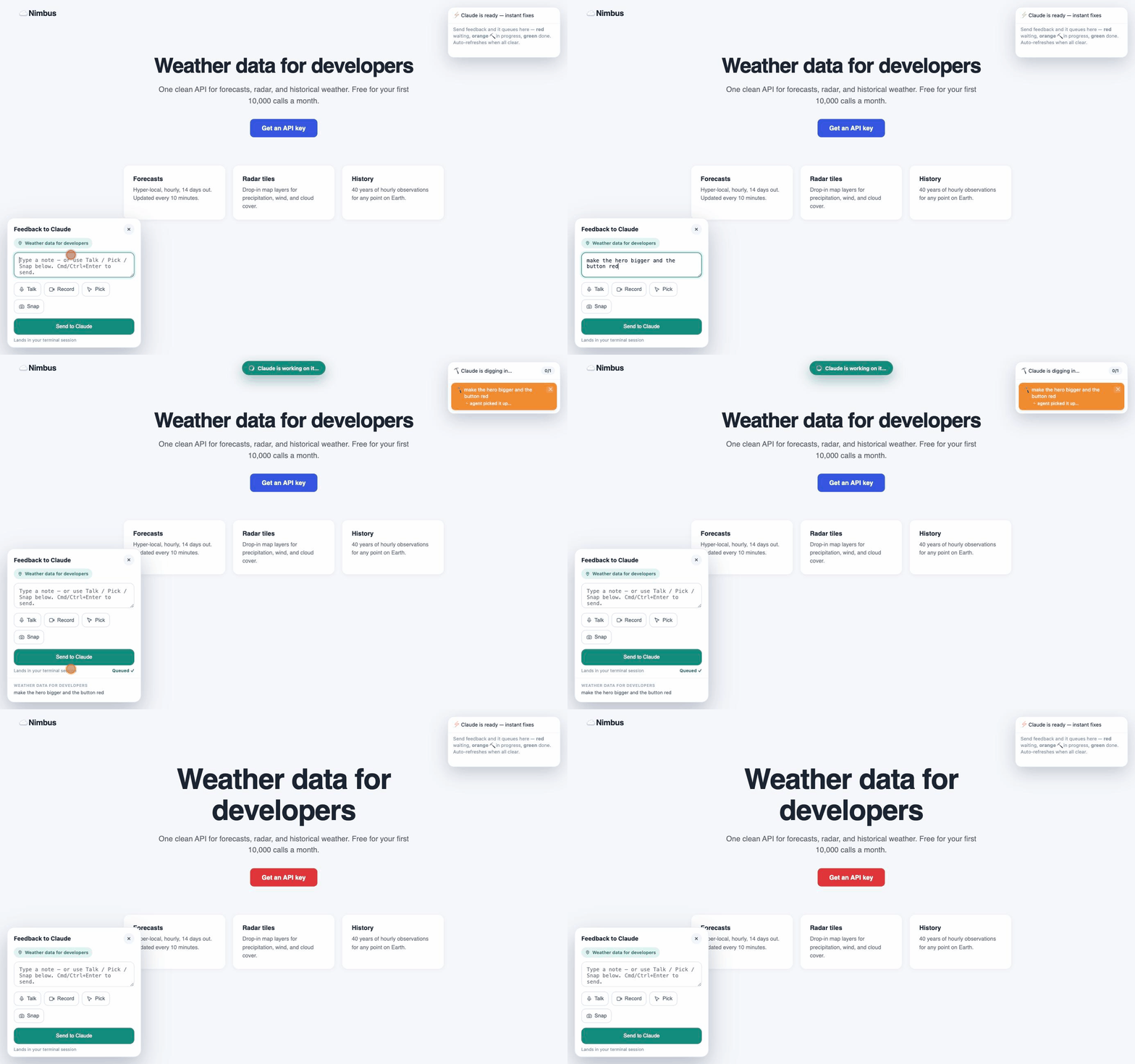
Say "make the hero bigger and the button red" — and watch it happen.
</div>open file.html is a dead end: file:// blocks the mic and screen capture, and there's no
way to tell the AI what to change without typing it all back into the terminal. YapUI is
the conversation on top of a live server.
Install
Needs Node 20+, a Chromium browser for screen recording (voice needs Chrome or
Edge), and the claude CLI for instant mode. Pick one route:
npx skills add tatendaz/yapui                                       # any agent — add -g for all your projects
git clone https://github.com/Tatendaz/yapui ~/.claude/skills/yapui  # personal, all your projects
git clone https://github.com/Tatendaz/yapui .claude/skills/yapui # this repo, shareable with your teamOr as a plugin, from inside Claude Code:
/plugin marketplace add Tatendaz/yapui
/plugin install yapui@yapui-marketplaceThen look for /yapui in the slash-command list. Not there? Run /reload-plugins, or
restart Claude Code once.
Or have an agent install it — paste this into Claude Code:
Install the YapUI skill: clone
https://github.com/Tatendaz/yapuiinto~/.claude/skills/yapui, confirmSKILL.mdexists there, then tell me how to use it.
Requirements in full, all four routes, verification, update and uninstall → Installing YapUI.
Use it
Ask Claude to preview some HTML — or invoke the skill directly with /yapui:
preview index.htmlClaude starts the local relay, opens the page, and boots a pre-warmed agent that owns the feedback loop. The panel is already open: choose ⌨️ type · 🎙 Talk · 🎬 Record · 📸 Snap · 🎯 Pick and send. Your card goes 🔴 queued → 🟠 working → ✅ done, and when they're all green the page refreshes itself.
Docs
| How it works | The relay, the resident agent, and why it's ~40 ms to first status |
| Configuration | Env vars, model choice, and what the agent is allowed to touch |
| What leaves your machine | Stored locally vs. sent to the Anthropic API |
| Troubleshooting | Watcher mode, ports, mic permissions, ffmpeg |
| Contributing | 30-second dev setup, zero dependencies to install |
Issues and PRs welcome — especially new feedback modes and browser-state polish. Bugs and ideas go through the issue templates; security reports go privately.
License
MIT © Tatendaz